Change the window header text on OSX
Answered

Is there a way to change the PhpStorm window text? It cuts out just the relevant info for me.
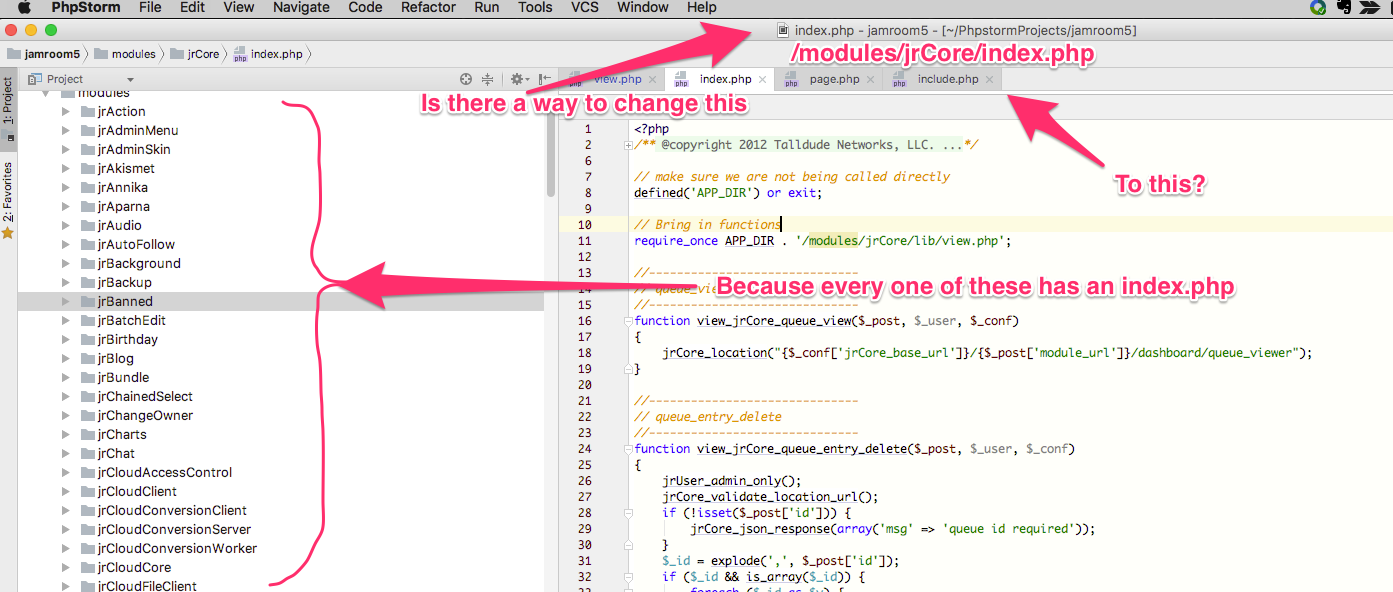
Thanks.
Please sign in to leave a comment.
Hi there,
AFAIK -- no.
https://youtrack.jetbrains.com/issue/IDEA-98839
(some people are asking to have project name first: https://youtrack.jetbrains.com/issue/IDEA-126894)
P.S. Will adding folder info to actual editor tab do any good for you?
If i have more than one file of the same file name open then the tab gets prefixed with the module and it is useful. But only when I have more than one modules file open.
Im not as upset about it as the commenters in https://youtrack.jetbrains.com/issue/IDEA-98839 .
Was just thinking I would prefer it to show if possible.
Thanks Andriy.
>If i have more than one file of the same file name open then the tab gets prefixed with the module and it is useful. But only when I have more than one modules file open.
Please disable built-in functionality (Settings/Preferences | Editor | General | Editor Tabs --> Show directory in editor tabs for non-unique filenames) and try Tabdir plugin instead -- it will show folders always and is configurable.
Obviously -- it's for editor tabs -- it does not affect (should not) actual window title.
Great call Andriy!! that is much better. :)
@michael
Please try new Custom Title plugin (github link: https://github.com/mabdurrahman/custom-title-plugin )
Not understanding how to install it, sorry. Tried:
* install from disk
-- tried using custom-title-plugin-master.zip (the github repop downloaded)
-- tried unpackaging that and selecting various files in the package
-- tried PLUGINS -> BROWSE REPOSITORIES and adding the github link
-- tried drag-n-drop various things to the PLUGINS area
All not the correct way to install it.
Use the usual "Plugins | Browse Repositories..." and find it there by name.
I gave the github link just to show what this plugin is about.
yeah, its working. Could use some extra variables though. LIke fileRelativePath (the path from the project root), dont need to see the path to the base of the project, because that will be the same for every file.
Currently
/path/to/my/homeDirectory/PhpStorm_Project/skins/someSkin/someFile.tpl
Better
/skins/someSkin/someFile.tpl
With this I have a better title than I had before, thanks very much.
Well .. from what I see some sort of JavaScript code can be used in actual template .. so you may try and play around to subtract
projectPathfromfilePathto get the relative path (that's if I read the possible values of those variables correctly).Otherwise -- file a ticket to the author. He stated there: "More variables going to be added on upcoming releases".
what im seeing is not as free as a template, its a couple of input fields:
So I could have the page title of:
[ jrElastic2 ] skin.css - Jamroom5
But could not have the title of:
Jamroom5 - [ jrElastic2 ] skin.css
because of the available variables in each position. The positions correspond to:
(File Title Template) - (Project Title Template)
There is a projectPath variable which gives you:
/path/to/where/your/project/is/stored
but there is no equivalent that takes you from when the project is stored to the current file.
Its a good idea and with time Im sure it will have more variables added making it more useful. Thanks for letting me know about it. :)
Yeah .. it seems that you cannot have 100% free title -- you still have to follow some rules.
But what I meant is -- "Advanced usage" section (https://github.com/mabdurrahman/custom-title-plugin#advanced-usage) -- it shows there that some sort of JS code can be used (to add week number in that example) ... so it might be possible to make "relative path" out of those 2 variables that I have mentioned last time.
If the path to a file is:
/path/to/home/phpstorm_projects/jamroom5/skins/jrElastic2/css/skin.css
then
projectPathis/path/to/home/phpstorm_projects/jamroom5
and
filePath is/path/to/home/phpstorm_projects/jamroom5/skins/jrElastic2/css/skin.css
There is no variable for
/skins/jrElastic2/css/skin.css
>There is no variable for
>/skins/jrElastic2/css/skin.css
You are misreading my comment.
Yes -- there is no such variable.
But ... accordingly to the code samples there (aforementioned "Advanced usage" section) it looks like it's possible to use JavaScript there .. so it MIGHT be possible to use some string manipulations to MAKE such "variable" yourself (in that example the "week number" is added to the title -- and there is NO variable for "week number" -- right?).
'Custom Title' plugin compatibility broke with 2019.3. Current version of the plugin is 0.3.
michael ussher It seems that the plugin author has abandoned it, nothing much we can do about it.
Someone has already pushed it to his tracker: https://github.com/mabdurrahman/custom-title-plugin/issues/5