Cannot Save File when running a watcher
Answered

Hi, Jetbrains.
Recently I'm experiencing this issue while developing my Laravel App. I'm using laravel mix to build my public asset (front-end app), everything's seems fine but when I run `npm run serve`, which is starting a file watcher & browsersync server for development and I edit some file and I hit save this popup always appears so I can't save my file afterward.
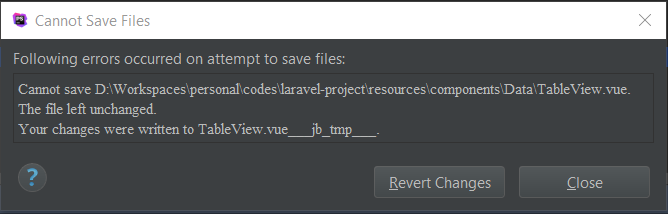
What is this? and why is this happen?
Thank you.
Please sign in to leave a comment.
Hello,
The message means that PhpStorm succeeded at writing new file content to a temp. file ('TableView.vue___jb_tmp___') but failed to rename the original one (to 'TableView.vue___jb_old___'). Possibly you do not have permissions to delete files in the directory.
If permissions is the case, you may turn off File | Settings | Appearance & Behavior | System Settings > "Use safe write" option in settings - this way PhpStorm will overwrite files in place.
Hello Vladimir Luchansky,
Thanks for the solution & that's works perfectly.
Regards.