Remove project name from file tabs

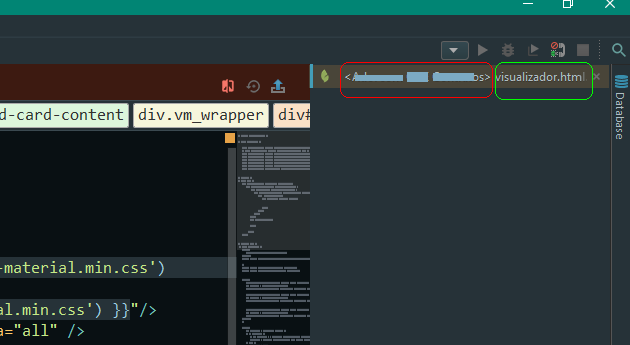
Is there a way to remove the project name from the file tabs? I don't need the name there, I know which project I'm working on. It takes too much space, I can't see the filename but the project name. I like to use the file tabs on right, but it takes too much space the project name:
Please sign in to leave a comment.
Hello,
We already have a related request submitted to our tracker here: <https://youtrack.jetbrains.com/issue/IDEA-126014>. Please vote for it (thumb up button) in order to move it up in the queue and receive notifications regarding the progress of the issue. See more information on working with tracker at <https://intellij-support.jetbrains.com/hc/en-us/articles/207241135-How-to-follow-YouTrack-issues-and-receive-notifications>.
@Vladimir Luchansky
It's a different one -- this one is about extra text on Editor Tab (OP has them on the right side)
I personally do not know what that is. Maybe multiple (attached) projects opened in the same window? Maybe some plugin?
Cannot give any better suggestion .. as I have never seen "<some text here>" in the editor tab.
Hmm, I get it.
It's not the name of the Project. It's the name of the Remote Host that I'm using in that moment:
The Project name is in that "grey", but cyan and "133" are the name of Remote Hosts... I just work wiith remote host, but I have to create an empty project in order to use Phpstorm... duh.
That's not a common way of using PhpStorm - to work with remote sources only, so there's no way to turn this off - feel free to submit a usability issue:
https://youtrack.jetbrains.com/newIssue?project=WI
Hey I know exactly what your talking about and although you can not completely remove the remote host name you can shorten it...if you go to the configuration for the remote host you are on you can edit the name to whatever you want I just made it blank so now all I see is <> filename.ext hope that helps.