PyCharm menu has a bunch of garbled text
Answered

Hi,
Recently, my PyCharm menu and options have all become illegible text, and I'm not sure how to fix this. I've checked all my language settings, system locale, etc. and they're all English. I proceeded to uninstall and reinstall PyCharm but that has not helped.
After the reinstall, I took a screenshot to show what it looks like: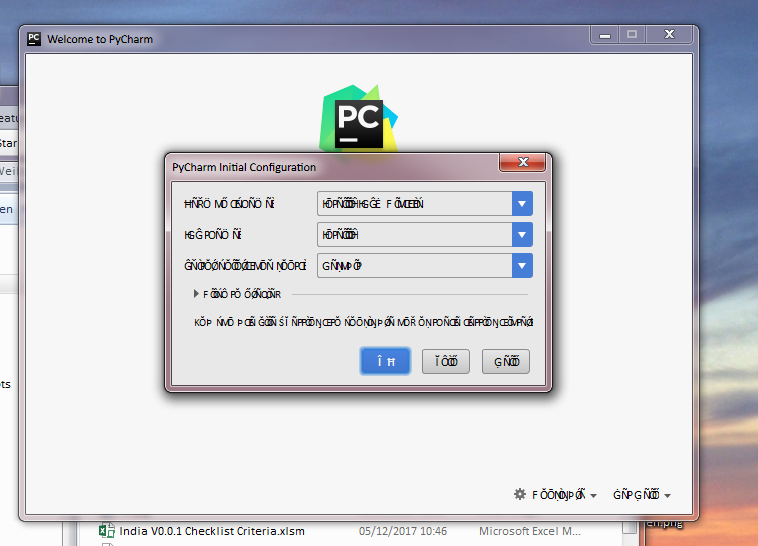
If anyone can help me I'd appreciate it.
Thanks,
Weilun
Please sign in to leave a comment.
Hi Garfield! Try to remove/rename .PyCharm<VERSION> folder in your user home directory (https://intellij-support.jetbrains.com/hc/en-us/articles/206544519-Directories-used-by-the-IDE-to-store-settings-caches-plugins-and-logs) this should force PyCharm to start with default settings. Has it helped?
Hi Pavel,
Thanks for getting to me so quickly. Unfortunately, that did not help.
Thank you,
Weilun
Hi,
It has been a week and I wanted to make sure that this issue is still being looked at? I hate to say it, but I can't just wait for it to work, so I can go to another IDE if this ends up being a unresolved issue.
Thank you,
Weilun
Sorry for the late response Garfield! Unfortunately I can't reproduce the problem on my side, but I have two ideas:
Hi Pavel,
You're ok. Those solutions did not work either though.
Thank you,
Weilun
Please try to change the UI font here http://i.imgur.com/jBnNOls.png. Does it help?
Hi Anna,
It worked thank you! That's curious though, because I suspected it was a system font setting problem, but I've tried messing with that to no avail. I'm glad there's a way to override the system font in PyCharm though.
Thank you,
Weilun
This just happened to me in Webstorm 2018.2.4
There's nothing I can pinpoint that I changed. Changing the default font worked, but now the text just doesn't look right (too narrow) but I can at least read it!
It only fixed it temporarily. It's back. :( Note that I am using "Material UI" plugin. I wonder if it has anything to do with that? I'm going to try to reinstall.
EDIT: Reinstall fixed it. Thanks