CucumberJS - cannot debug step definition code

We are using WebStorm 2017.1.2 Build #WS-171.4249.40, built on April 25, 2017.
The execution kicks off via a Gulp.js run/debug configuration. A particular gulp task is called which then kicks off the execution of the Cucumber feature files which in tern runs the Node JS code.
The issue I am facing is that the execution flow does not halts at breakpoints I apply to the code inside the JS files while running this suite.
The run/debug configuration looks like this:
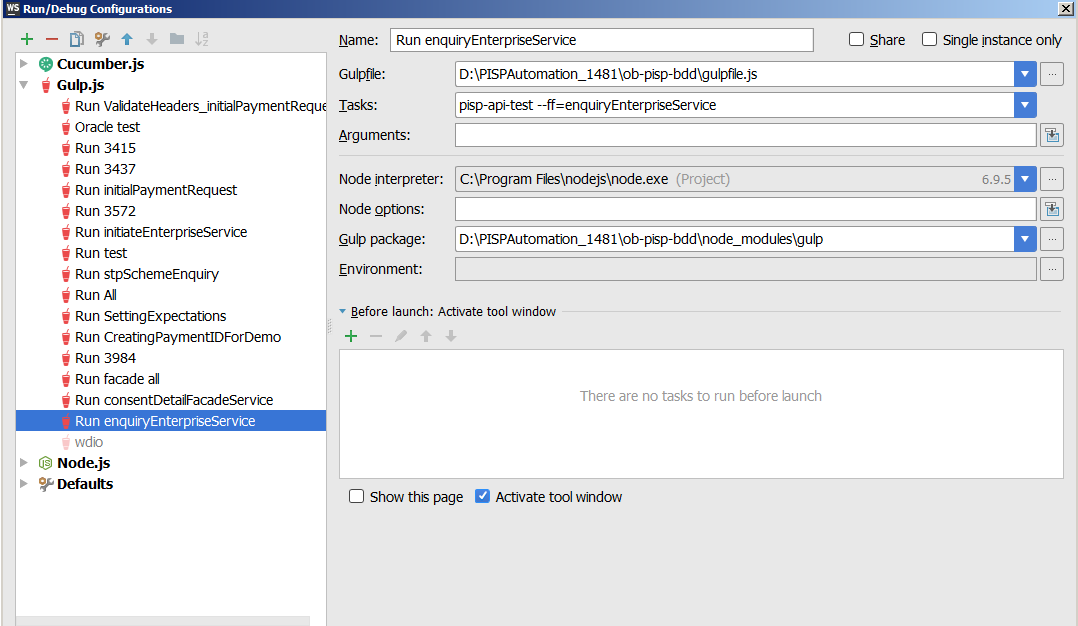
When the execution is kicked off in debug mode - the console displays the following lines:
"C:\Program Files\JetBrains\WebStorm 2017.1.2\bin\runnerw.exe" "C:\Program Files\nodejs\node.exe" --debug-brk=50518 --expose_debug_as=v8debug D:\PISPAutomation_1481\ob-pisp-bdd\node_modules\gulp\bin\gulp.js --color --gulpfile D:\PISPAutomation_1481\ob-pisp-bdd\gulpfile.js pisp-api-test --ff=enquiryEnterpriseService
Debugger listening on [::]:50518
[00:10:08] Using gulpfile D:\PISPAutomation_1481\ob-pisp-bdd\gulpfile.js
[00:10:08] Starting 'pisp-api-test'...
[00:10:08] spawn wdio with these attributes:
--debug-brk=50518
--expose_debug_as=v8debug
D:\PISPAutomation_1481\ob-pisp-bdd\node_modules\core-cucumber-bdd\cuke-2017-06-14T23-10-08.849Z.tmp
read world successfully......
Please sign in to leave a comment.
Debugging Cucumber through Gulp (I've tried https://github.com/vgamula/gulp-cucumber to run it) works fine for me
Looks like I need a project to see what's going on. Can you provide it? It shouldn't be your actual project, just a pair of dummy features, but configuration should be the same as yours, so that the issue can be recreated with it
Thanks Elena for your response.
How would I send those files to you?
Also can you please paste the screenshot of your run/debug configuration please?
You can put files on a file server and provide a link.
Here is a screenshot of my run configuration:
I am not sure I can upload the code on some external server as this involves compliance issues. Is there a way we can do screensharing on this issue?
my official email id is - rgulati3@sapient.com, in case you wish to reach out for working out screen sharing. Only if this is fine with you..!!
Screensharing will unlikely help unfortunately. Normally such issues require playing with code/configurations - not something that can be done during a call