Apparent discrepancies in preferences

I'm still learn what I need to know about IntelliJ 2017 Ultimate. And, for the most part I love the heck out of it. But every once in a while I run into something that might be an anomaly (and might not). This is one of those times. I am a student working on learning Node/Express and the basics of middleware. I am running into a problem with the behavior of the exercise (but I will take that up within the boundaries of the teaching community I am working within.
However, in the process of doing my due diligence before seeking help, I was re-examining preferences and settings within IntelliJ 2017 Ultimate -- just to cover all my bases. I discovered the following situation in my preferences. I don't know if it is a problem or not. But I did try and change things and couldn't figure out how. I took a screen shoot and have included it.
You will notice at the top the the node interpreter is 6.10.3 but in the packages, node is 0.0.0. I am running under node 6.10.3. In the first place I'm not sure node should be in the packages. My reason is, I think packages show up in node_modules and I believe node does not need to be in node_modules. Am I right? Secondly, is there some kind of conflict created the the different versions between the interpreter and the packages.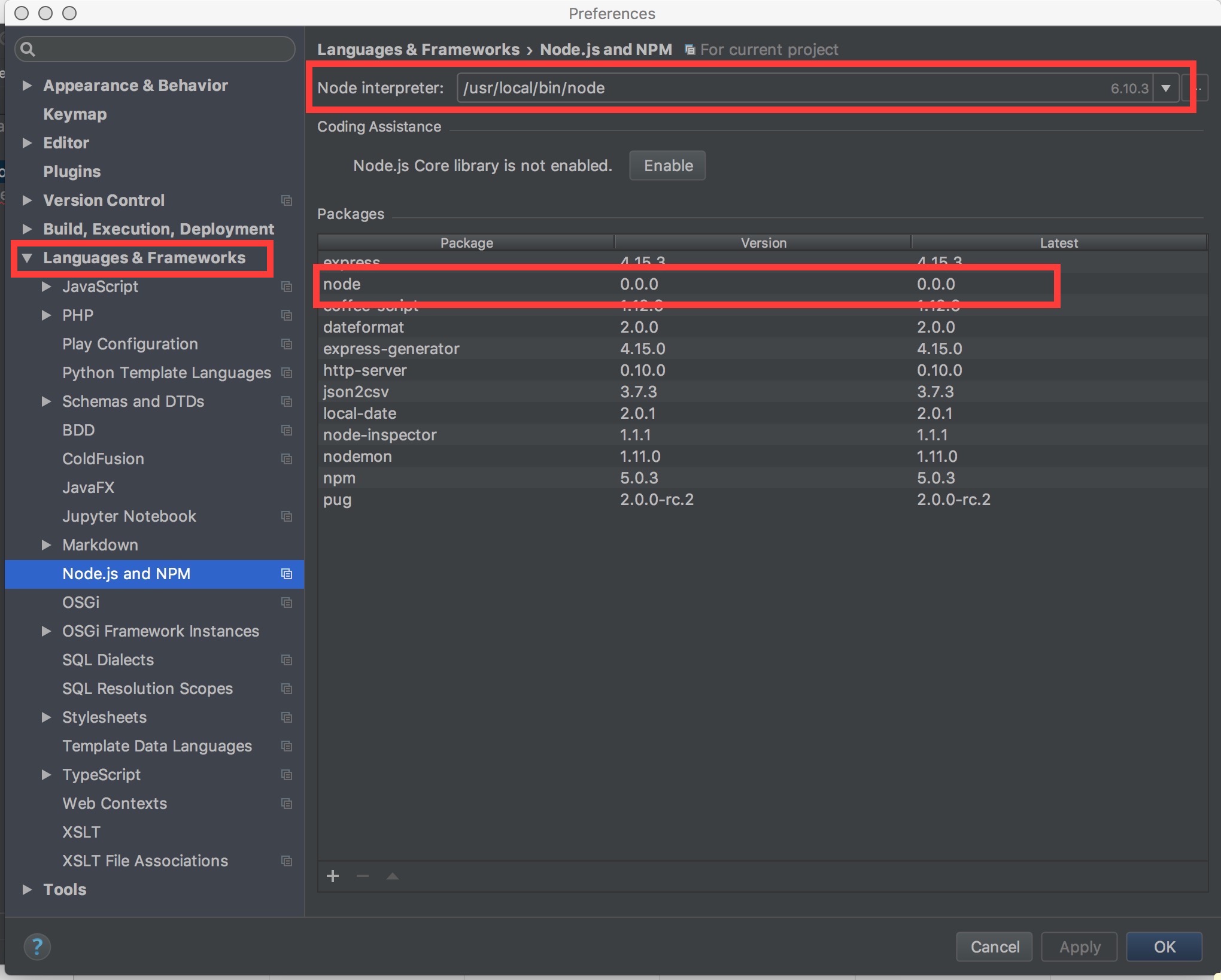
Please sign in to leave a comment.
'node' shouldn't normally appear in the packages list. What does your package.json look like? Please provide it