Paused icon in debug console
Answered

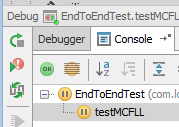
Hi while debugging a Java program at one point the session seemed to freeze and I see this paused icon. What does this mean? At this point pressing F8 or F9 doesn't seem to matter.
I use
IntelliJ IDEA 2017.1.4
Build #IU-171.4694.23, built on June 6, 2017
JRE: 1.8.0_40-b26 amd64
JVM: Java HotSpot(TM) 64-Bit Server VM by Oracle Corporation
Windows 8 6.2
Please sign in to leave a comment.
This icon means that this specific test execution is PAUSED. You will see it when the breakpoint inside the test is hit.
It doesn't explain why you can't continue.
Thanks Serge. As you pointed out the pause icon has nothing to do with the debugger window. I am having other issues with setting bp's inside concurrent processing applications. I am working with a message-driven actor system (Akka) and the behaviour of bp's is unpredictable to say the least :-(
Check the breakpoints suspend policy (all threads vs current thread).