Debug option not available/does nothing using Python plugin in IDEA 2017.1
Answered

I can't get IDEA to run a python script in the debugger. The run functionality works correctly, but the Debug button is "grayed out" and the context menu option to Debug has no effect.
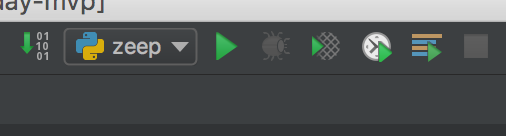
I tried making a brand new python project and I get the same issue
Please sign in to leave a comment.
Please provide the screenshot of the run/debug configuration.
Can't reproduce. Could you please specify the exact IntelliJ IDEA and Python plug-in versions that you have?
Can you try it with some other Python interpreter?
Same issue with python3 (non homebrew). Python plugin version: Version: 2017.1.171.4694.26
I don't even have an option to show the debug console at the bottom left of IDEA
Same version here. Debug console tool window option will appear only after debug session is started.
Any errors in idea.log (https://intellij-support.jetbrains.com/hc/articles/207241085)?
Can you reproduce it in a new project?
New projects have the same error. The only thing I see relevant to python in the log is a stack trace about Invalid Root
When I do an `ls` on the root, it exists. I know there was a bug I reported a couple years ago in PyCharm where it had problems with directories that had spaces in the name.
Not sure it's related to the problem.
Bug report with the logs directory zipped is welcome at https://youtrack.jetbrains.com/issues/PY.
Thanks for trying to work it out with me. I'll post a bug. Does it go in the PyCharm tracker since it's the plugin for IDEA?
Since it's specific to Python, PyCharm tracker would the proper project.