scss variables not recognized

Hi, I'm new to webstorm and have run into an scss problem - my variables are not being recognized.
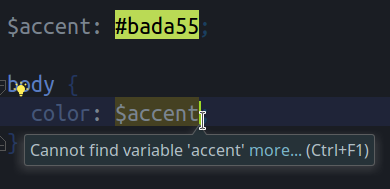
What am i doing wrong?
I have the sass plugin (which i assume includes scss support) enabled.
webstorm 2017.1.4 on KDE neon 16.04
thanks
Please sign in to leave a comment.
works fine for me
please try invalidating caches (File | Invalidate caches, Invalidate and restart) - does the problem persist?
If I am not mistaken, I believe it was added in 2017.2.
no, this is a standard SCSS variables syntax, and it works in the same way in previous versions
upgraded to 2017.2 and problem fixed :)
I am using 2017.2 on OSX, and I am having this same problem. It doesn't detect dollar-sign variables as valid syntax. Also it's complaining about other SASS syntax, such as &-selectors.
Sass support 172.3968.27 plugin is enabled. Our project is using NPM&React so I would not want to install any Ruby-related tooling as instructed Jetbrains website documentation.
Or taking that back, once again copying my IntelliJ IDEA configuration to WebStorm, caused *.scss file-mapping to be removed. I added it back and works like a charm!
Hello,
I'm still having this problem, but in PHPStorm.
I have a very simple scss file with some variables at the beginning of the file and when I try to use them later on the same file, it says that the variable isn't recognized.
Any ideas?
Please share a file that shows up the issue plus screenshots illustrating it
Elena, I was compilig the information you asked and noticed that I had the sass folder marked as resource and excluded.
I removed the excluded and it started working.