new react app installs files in AppData instead of project folder

creating new react app (which utilises create-react-app)
create-react-app is installed globally
expected: New project would be created in specified location along with package.json build and src folders
found: project is created in the location of the installed create-react-app module
when project is created the run window displays the following:
"C:\Program Files\nodejs\node.exe" C:\Users\xxx\AppData\Roaming\npm\node_modules\create-react-app\index.js tictactoe2
Creating a new React app in C:\Users\xxx\AppData\Local\Temp\1500376849230-0\tictactoe2.
Am I missing a switch when I use the create react app wizard? a switch telling it where the project is? the project location is specified in the new project dialogue. The dialogue correctly detects the location of the create-react-app module.
I have included a screenshot of the IDE after the installation is completed. You can see the location where the app was installed, and the lack of project files in the project tool window.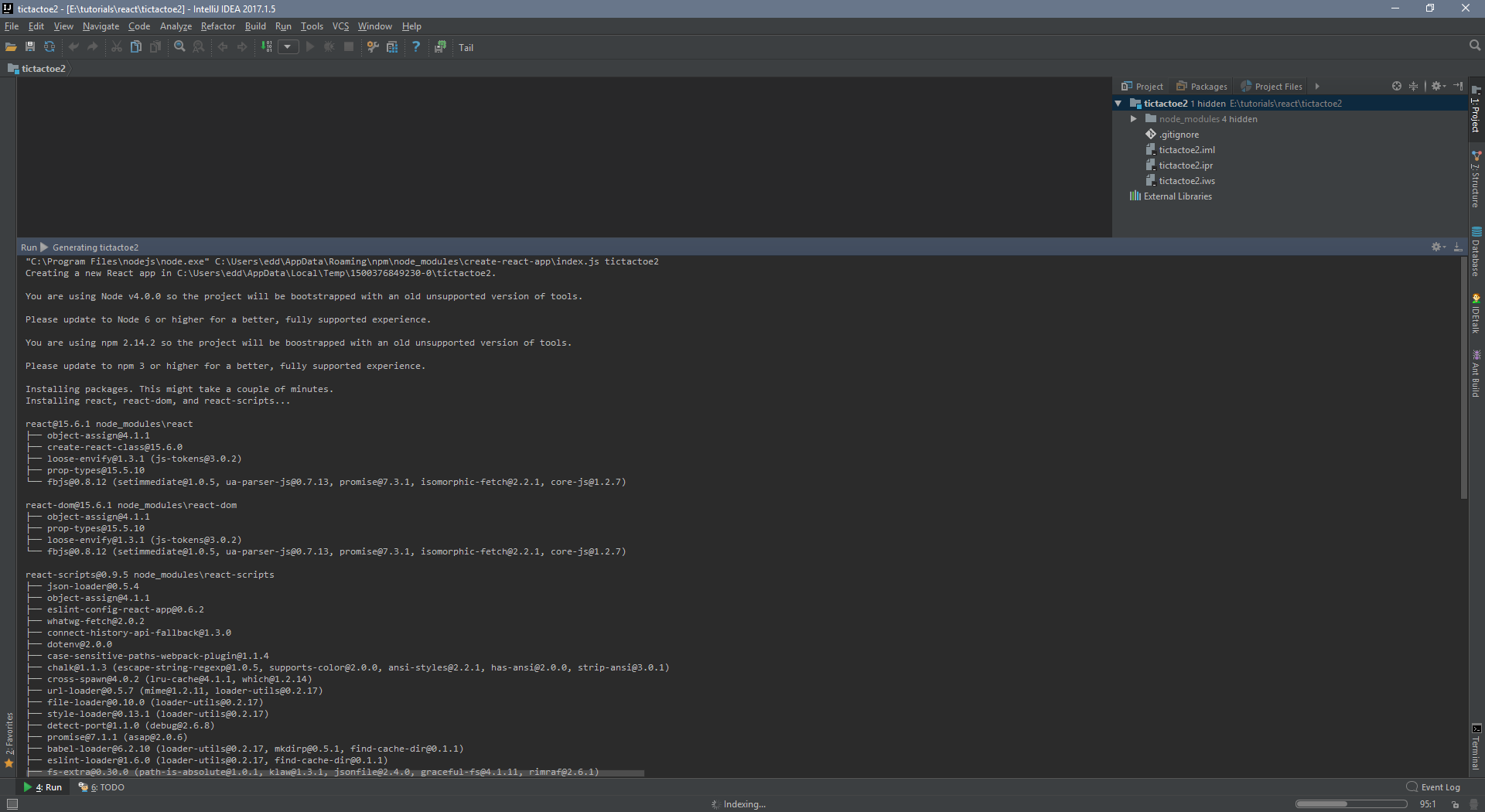
thanks
Please sign in to leave a comment.
What create-react-app version do you use? Seems copying of created files from the TEMP to the target folder has failed for some reason. Please provide your idea.log (https://intellij-support.jetbrains.com/hc/en-us/articles/207241085-Locating-IDE-log-files) - don't copy its content here, put it on some file server and provide a link
Hi
Thanks for getting back. I guessed that something like that had happened. If it helps, my nodemodules are on a different drive from the location of the project, but still both are mounted as local drives.
the create-react-app version is listed as a global install 'create-react-app@1.3.3'
my idea.log is here (I had to change the file extension so it could be served) http://bleepbloop.net/dump/idea.txt
thank you
Ed
to be fair, I didn't check for updates, and there is a major revision I could do.
I will not do it for now, so that you can see what is causing the problem and hopefully address it - but this is the update screen.
edd
Thanks! Looks similar to https://youtrack.jetbrains.com/issue/WEB-24820, but it's fixed in 2017.1.3... And it works fine for me in 2017.1.5
Can you check if the problem persists when creating a new project on C: drive (instead of E:)?
Hi.
I tried installing on C:/ and I got the same thing.
I also updated to the latest build 2017.2
Do you want me to send a log again?
Ed
yes, please... BTW, does the issue occur when creating a new project, or when adding a new module to existing project?
Hi
I can do React development if I create an empty static HTML project, but I have not successfully created a React App project yet, and whilst I could probably copy in src files etc I am still finding my feet with React so I am holding fire until this issue is fixed before I start adding modules etc.
new log for updated version of IDEA is here http://bleepbloop.net/dump/idea2.txt
thanks
Ed
so, to answer your question more clearly the problem occurs when I start a new React App project from the main menu - choosing 'React App' as the project type.
Ed
What project name did you use when creating a project? Can you record a screencast that shows your steps?
Also, can you check if the problem persists when using directory-based project format?
I can do a screencast - where should I upload the video too - can I do it from here as an image upload or should I host it somewhere like youtube?
Ed
You can put it on some file server and provide a link, or host it on youtube
Was there ever a resolution for this? I'm encountering the exact same issue.
Hi Rghull79
to be honest I was only experimenting with React and as I didn't continue developing in this way I didn't persist, but I tried again just now, and I think that I had no errors and everything was as it should have been. I had not done anything other than continue to update with each release.
If it helps I am currently using build #UI-181.4203.550
Ed
@Rghull79 Please can you elaborate on your issue? what OS and IDE version do you use? What problem have you experienced namely?
I'm using IDE version #IU-181.5087.20 on Windows 10 1709, build 16299.431.
I created a React App (Static HTML, React App, select my options, then Finish). The project is created in AppData\Local\Temp\..., and it never got copied over to the project directory I specified. The idea.log had an exception involving not able to access the temporary location. Attempted multiple times yesterday.
But...I just cleared my temp files and the next build worked correctly. So, I guess false alarm? I'll keep an eye on it and report back if it happens again. I'm new to IntelliJ so not sure if I didn't set something up correctly. Thanks for the quick response though!