How to turn of version control tracking indicator along left side of code window

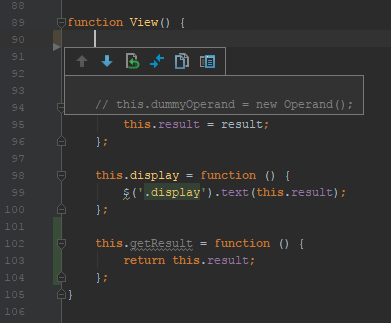
Just recently, I have noticed that PhpStorm is tracking every single change I make to my file by showing a green line beside added code and a tan line beside deleted code. While this makes rolling back changes very easy, I find the indicators a bit distracting, and would like to know how to toggle them off or otherwise make them go away.
I already use version control, but I do it directly through the terminal.
In this picture, you can see the tan indicator for deleted code (In my case, some unneeded code that I had already commented out) and the green indicator for added code (a getResult function). How can I make these colored indicators go away?
Please sign in to leave a comment.
File | Settings | Editor | General > Highlight modified lines in gutter