Duplicate entries when project is in a symlink'ed directory
Answered

I'm having this problem on a Windows 10 machine.
I've got a folder to which I've checked out all my projects: D:\Projects
And for various reasons, I've soft linked it to D:\Dev using "mklink /J Projects D:\Dev\Projects".
When I open up a project (e.g. D:\Dev\Projects\MyJsProject), and try to use the index (go to declaration, documentation), I get duplicate inputs. One leads to the file on D:\Dev\, and the leads to D:\Projects.
For example:
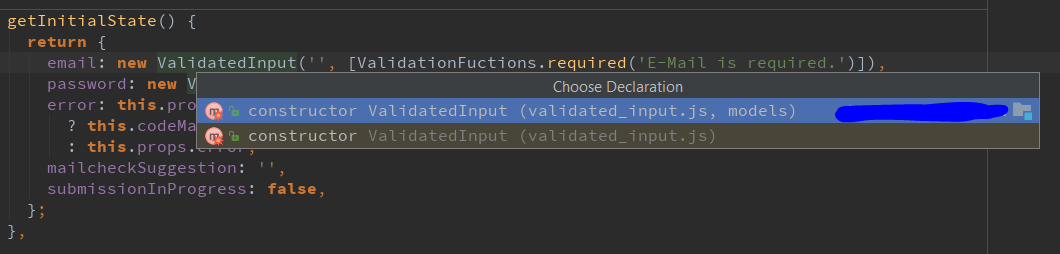
If I opened this project from D:\Projects\MyJsProject instead, this problem does not occur.
Also, I only seem to be seeing this problem in JS projects and not Java projects. I am using IDEA 2017.2.
Any ideas on how to fix this?
Please sign in to leave a comment.
Looks like https://youtrack.jetbrains.com/issue/WEB-25407.
I have a similar problem. But in my case it is the project view that shows some files to be double. But this is only for files on the top level!
For instance, I have a folder /some/folder/somewhere/project.
And then I have a symlinkg /myHome/project that points to the above folder.
Under this folder, I have some files and subfolders (e.g. src, gradle, and others), the stuff you have with any simple Java/Maven/Gradle project.
The project view shows me on the top level some files AND the actual project/module. When I open that one, I have the subfolders and the files again.
Also, In the local changes view, I have every file showing twice. One with the original path and one with the symlink.
When I reopen the project from the original path instead of the symlink, everything works as epected. No double entries of root files and no extra files showing up in the project view.
@Marcel, please follow https://youtrack.jetbrains.com/issue/IDEA-135921
@Petr: Thanks for the hint! The other ticket is exactly, what I mean.