Difference Between 'Run' and 'Preview'
Answered

So I am an absolute novice in both PHP and PhpStorm, so please excuse my naivety! What is the difference between these 2 tools?
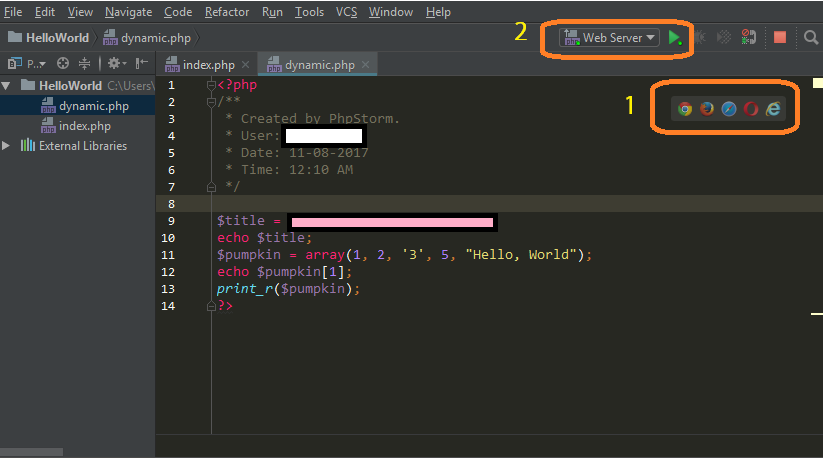
I understand the [1] actually helps me see the output on an web page, which is my general intention. So what does the [2] do, or what is it used for?
Thanks.
Please sign in to leave a comment.
Hello,
[2] is Run/Debug configurations list: https://www.jetbrains.com/help/phpstorm/run-debug-configurations.html. It allows to run/debug scripts and various configurations for different types of applications in a very flexible way.
Hi there,
[1] Just opens the current file in the browser using URL for currently active Deployment entry (if no such entry defined then built-in simple web server is used)
[2] Is actual Run/Debug Configuration -- it is not linked to currently-edited/selected file -- it works with the file/URL that is defined inside it .. and therefore can be called from any place/context. Because it can work with manually typed URLs .. it can work with "nice" ("SEO/user friendly") URLs as well.
Since you are new to PHP .. you are doing very straight forward approach when script/file that you execute has all needed info (links to needed include files etc).
With frameworks .. it's not the case as they have complex loading logic and they usually require single entry point script (e.g. index.php) in order to bootstrap/initialise the needed environment (register autoloading logic/read configs/load needed classes/etc) .. and then route URL to the needed Controller/class that will handle that particular request. Therefore you cannot execute or debug specific file directly (as in such case such bootstraping will simply not be preformed).
Therefore [1] can be used for rather simple stuff only (when you can execute that particular file directly) and [2] will handle all variety of cases, e.g. when you need to use nice URL or whatnot (different types of Run/Debug Configurations can do different things)