2017.2 new install Project panel file and folder text too small, hard to read

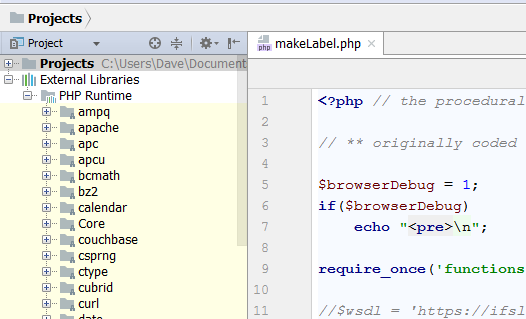
I just installed this on a fresh Windows 7 (reinstall), and now the Project files and folder text is tiny and hard to read... and I keep getting a warning in multiple places about HiDPI scaling causing a problem on Windows 8... but I'm not using Windows 8.
How do I increase the Project panel files/folders text size without screwing up the file editor tab text?
I tried overriding the default font in Settings, but no matter what I select, the file editor text is squished at any size... really frustrating.
Please sign in to leave a comment.
Hello,
What theme is set in File | Settings | Appearance & Behavior | Appearance? Is it "Windows"?
If so then please switch to "IntelliJ" and check how this will look.
It was set to Windows, but any theme still has squished file text. (two screenshots, 1st with Windows theme and Settings, 2nd with IntelliJ)
I don't know why the text wasn't squished in other versions of PHPStorm or on other computers, but my Windows 7 font setting is Medium 125% (default is Small but it's on a 15.6" Full HD laptop so text can get tiny).
The Project font size is doable either way but the code text being squished is not easy to read either way, and I'm not seeing how to adjust the line height. (I did install with the JRE x86 download, does that screw up the file text fonts?)
> I'm not seeing how to adjust the line height
Well, you can't - you can only adjust spacing, not height.
Please show a screenshot of Settings | Editor | Font.
Why's the font so squished? No matter what I select they're all squished... consolas looks the least squished, so I'll try that, but it's still odd compared to previous PHPStorm 8/9/10 installs.
The font looked this way in all versions. Latest version:
PhpStorm 10:
Hmm, maybe it was the Windows 10 installation on my previous work PC where the fonts looked more normal... but they still look squished compared to other editors.
Did you try other fonts like Consolas, Fira Code or Source Code Pro?
Yes, they only look fine in Windows 10.