Darcula Colours in Project Tree
Answered

I have just downloaded and installed the latest version of PyCharm (2017.2.3), and I want to use an appearance theme with "light" text on a "dark" background. So, in Settings->Appearance & Behaviour->Appearance, I chose "Darcula" for the Theme, and left all the other settings as default.
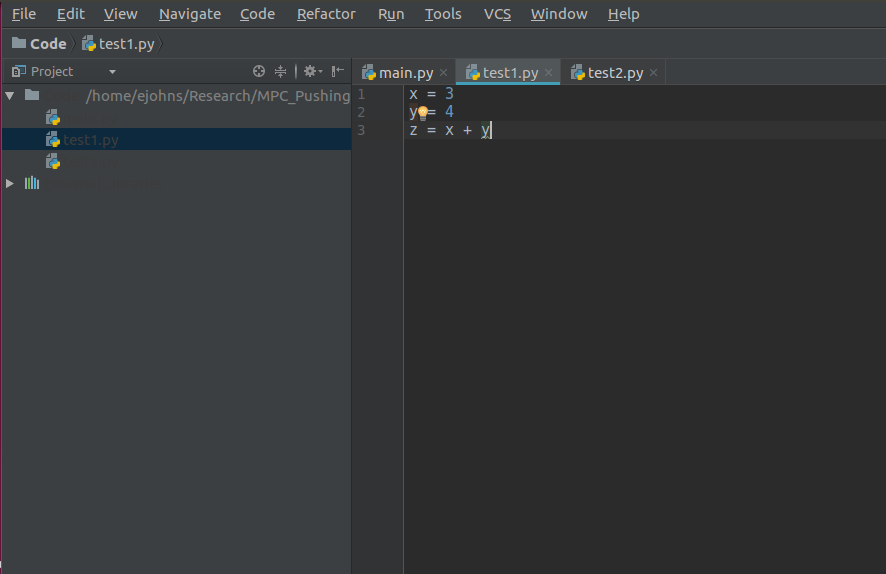
However, what I have found is that, whilst the code editor gives me "light" text on a "dark" background as expected, the project tree window (on the left of the code editor) shows "dark" text on a "dark" background. Therefore, it is almost impossible to see the names of the files in the project. The image below shows this.
Is this a bug, or is there a setting I should change?
Please sign in to leave a comment.
Hi Ejohns85! Which version of PyCharm is this? Do you use any custom plugins?
Hi, this is PyCharm (2017.2.3), which I just downloaded from the PyCharm website. I have not used any custom plugins. In fact, all I have done is followed the installation instructions, and nothing else. This is the first time I have run this version of PyCharm at all.