Can't run nosetests from context menu (Nosetest not appears on right click to test classes (Intellij IDEA))
Answered

Hi,
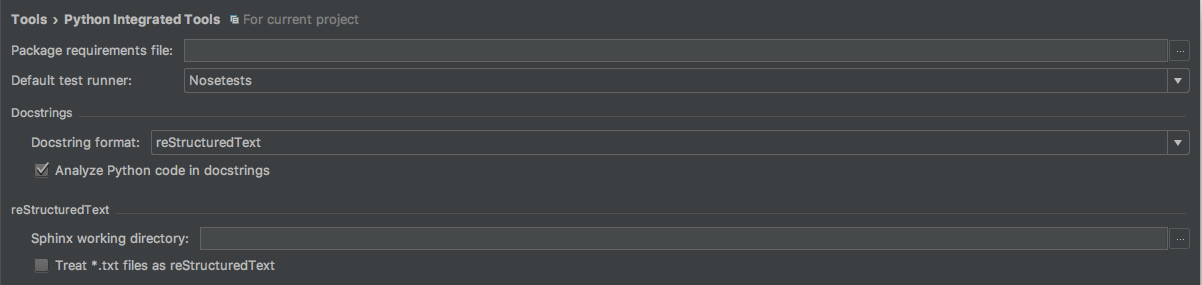
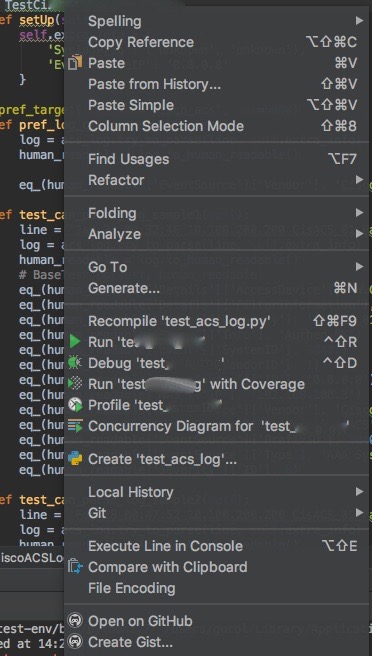
I am using Intellij IDEA. I am developing on Python 2.7. Project SDK is virtual environment on Python 2.7.13 . When I right clicked to test class, I couldn't see nosetest run configuration. I set the default test runner as Nosetests.
I added explicitly python test as a nosetests on the Run/Debug Configurations. I want to run automatically my test class or classes.
IntelliJ IDEA 2017.2.4
Build #IU-172.4155.36, built on September 11, 2017
JRE: 1.8.0_152-release-915-b11 x86_64
JVM: OpenJDK 64-Bit Server VM by JetBrains s.r.o
Mac OS X 10.12.6
Please sign in to leave a comment.
Looks related: https://youtrack.jetbrains.com/issue/PY-25364
Thank you Yaroslav, I will check it.
Please try to invoke Ctrl+Alr+R, do you see a run configuration for nosetests?
If no, please check the problem in Intellij IDEA 2017.3 EAP: https://www.jetbrains.com/idea/nextversion/. Does the problem remain?
I think you want to wrote CTRL+ALT+R but I invoked this, nothing happen.
This bug has been fixed in Intellij IDEA 2017.3 EAP. Thank you for reply.