Gradle issues with the new IntelliJ version 2.6
Answered

I am having some gradle issues when I updated Intellij version 2.6. See bellow.
1. The build.gradle doesn't seem to be highlighted.
2. When I import the project and I click to import changes to the gradle project or if i refresh I get issues about Kotlin.
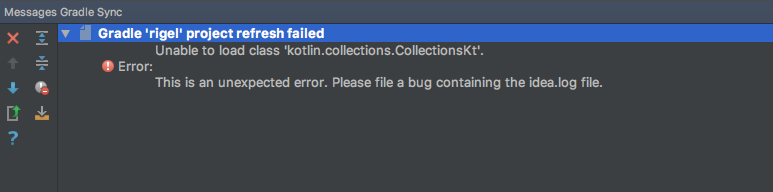

I am not using Kotlin for this project but I do have another project that depends on this one which uses Kotlin. I already updated Kotlin as well with the latest version recommended in the other project.
What I have done so far is Invalidate Caches/Restart, clear caches, and reimport gradle projects by using gradle idea.
Please let me know what else I can do to run this gradle properly!
Please sign in to leave a comment.
Looks related: https://youtrack.jetbrains.com/issue/KT-20967
distributionUrl=https\://services.gradle.org/distributions/gradle-4.1-bin.zip`and finally works! Made a comment on that link too.