HTML file is higlighted

Hello,
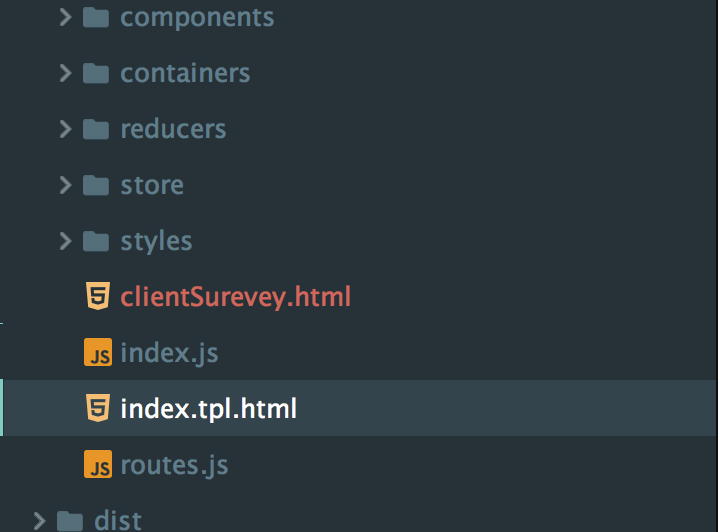
I created a new html file in WebStorm, but somehow the file is highlighted red, same as multiple folders. I am wondering what is going on with this, and if there is anything I can do to change this - Please refer to the attached image file for clarity or the video clip here.

Please sign in to leave a comment.
Normally unversioned files are highlighted this way. Is your project version controlled?
Note that you can change the colors used for VCS status highlighting in Settings | Version Control | File Status Colors
Thanks! So the highlights means the changes (difference) between my local and whats on the repository?
Yes; please see https://www.jetbrains.com/help/webstorm/2017.3/file-status-highlights.html for more info
Thanks again. What I just realized is that I cant edit the files - if I hit on the "delete" button, it acts as if i'm tapping the left/right arrow button. Please see video for clarification: https://flic.kr/p/HumEn4
Based on the color code from this link: https://www.jetbrains.com/help/webstorm/2017.3/file-status-highlights.html
it says "During the last update, file was merged with conflicts. " . The thing is I just created this file, and haven't done any updates yet.
>What I just realized is that I cant edit the files - if I hit on the "delete" button, it acts as if i'm tapping the left/right arrow button.
do you have IdeaVim plugin installed? Please provide your idea.log (https://intellij-support.jetbrains.com/hc/en-us/articles/207241085-Locating-IDE-log-files)
>Based on the color code from this link: https://www.jetbrains.com/help/webstorm/2017.3/file-status-highlights.htmlit says "During the last update, file was merged with conflicts. " .
no, it's rather `unversioned` - file exists locally, but is not in the repository, and is not scheduled for adding.