# # A fatal error has been detected by the Java Runtime Environment: # # EXCEPTION_ACCESS_VIOLATION (0xc0000005) at pc=0x1958a4a1, pid=4708, tid=0x0000121c # # JRE version: OpenJDK Runtime Environment (8.0_152-b08) (build 1.8.0_152-release-1024-b8) # Java VM: OpenJDK Server VM (25.152-b8 mixed mode windows-x86 ) # Problematic frame: # C 0x1958a4a1 # # Failed to write core dump. Minidumps are not enabled by default on client versions of Windows # # If you would like to submit a bug report, please visit: # http://bugreport.java.com/bugreport/crash.jsp # The crash happened outside the Java Virtual Machine in native code. # See problematic frame for where to report the bug. #
--------------- S Y S T E M ---------------
OS: Windows 10.0 Build 16299 (10.0.16299.15)
CPU:total 2 (initial active 2) (2 cores per cpu, 1 threads per core) family 6 model 42 stepping 7, cmov, cx8, fxsr, mmx, sse, sse2, sse3, ssse3, sse4.1, sse4.2, popcnt, clmul, tsc, tscinvbit
vm_info: OpenJDK Server VM (25.152-b8) for windows-x86 JRE (1.8.0_152-release-1024-b8), built on Nov 14 2017 15:10:32 by "builduser" with MS VC++ 10.0 (VS2010)
time: Sat Dec 30 17:17:49 2017 elapsed time: 1 seconds (0d 0h 0m 1s)
I get application error when starting PyCharm on Win 10 64 bit. No further information is displayed. Everything was OK until I restarted my PC yesterday. I tried to reinstall and to install a never version (both, prof and community) PyCharm but the same error message popsup when I start the app. Do you have any idea how to fix this or how to get more info about origin of the error?
Could this be related to Windows update, Microsoft pushed critical update related to Intel processor security hole, and I think after this i have problems, however, reverting the update is not helping now, the error is still here.
starting .../bin/pycharm.exe. or .../bin/pycharm64.exe doesn't work any more. However starting IDE using .../bin/pycharm.bat works for me. It manages to configure everything correctly. It would be useful to see more detaild error message and not just Application error.

#
# A fatal error has been detected by the Java Runtime Environment:
#
# EXCEPTION_ACCESS_VIOLATION (0xc0000005) at pc=0x1958a4a1, pid=4708, tid=0x0000121c
#
# JRE version: OpenJDK Runtime Environment (8.0_152-b08) (build 1.8.0_152-release-1024-b8)
# Java VM: OpenJDK Server VM (25.152-b8 mixed mode windows-x86 )
# Problematic frame:
# C 0x1958a4a1
#
# Failed to write core dump. Minidumps are not enabled by default on client versions of Windows
#
# If you would like to submit a bug report, please visit:
# http://bugreport.java.com/bugreport/crash.jsp
# The crash happened outside the Java Virtual Machine in native code.
# See problematic frame for where to report the bug.
#
--------------- S Y S T E M ---------------
OS: Windows 10.0 Build 16299 (10.0.16299.15)
CPU:total 2 (initial active 2) (2 cores per cpu, 1 threads per core) family 6 model 42 stepping 7, cmov, cx8, fxsr, mmx, sse, sse2, sse3, ssse3, sse4.1, sse4.2, popcnt, clmul, tsc, tscinvbit
Memory: 4k page, physical 2832236k(1749792k free), swap 4142956k(3004556k free)
vm_info: OpenJDK Server VM (25.152-b8) for windows-x86 JRE (1.8.0_152-release-1024-b8), built on Nov 14 2017 15:10:32 by "builduser" with MS VC++ 10.0 (VS2010)
time: Sat Dec 30 17:17:49 2017
elapsed time: 1 seconds (0d 0h 0m 1s)
This is the error report, im totally new on this, a beginner
Could this be related to Windows update, Microsoft pushed critical update related to Intel processor security hole, and I think after this i have problems, however, reverting the update is not helping now, the error is still here.
starting .../bin/pycharm.exe. or .../bin/pycharm64.exe doesn't work any more. However starting IDE using .../bin/pycharm.bat works for me. It manages to configure everything correctly. It would be useful to see more detaild error message and not just Application error.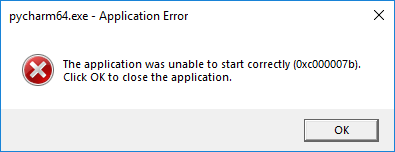
I'm having the exact same issue that Sanjin is. pycharm.bat works for me.