reformat code else if
Answered

Hi,
I think there is a bug with the Reformat Code :
All my if { ... } else if { ... } statements are rewritten to :
if {
...
} else {
    if {
    ...
    }
}
I guess this is a bug or conflict between two options in PHP Code Style preferences but I can't find which one.
The only one related to else if statements is under the Other tab and it's not enabled in my config.
Thanks
Please sign in to leave a comment.
Hello, Maxime. This is in no way a bug. This is actually how the code should be structured if you want to keep it neat. The only reason you usually don't see the brackets surrounding the else is because in most if-else-if cases the only statement within the else clause is another if, hence the omitted brackets. You probably know this, but it's worth mentioning:
If($foo) echo "bar";
and
If($foo) {echo "bar";}
are the same thing.
This is the same reason why the else clause can have or not have the brackets.
Hy Smytt, thank you but you have misunderstood my problem which is not related to having or not having brackets around else. Again, when I write a if { ... } else if { ... } and use the Reformat Code feature the code is rewritten to if { ... } else { if { ... } }. The “else if” is rewritten to a “if” imbricated in the “else”. I don’t want this to be rewritten.
So I guess this is a bug or an option in the Reformat Code confie but I can’t find which one.
Hello again.
What I meant was that it didn't make a difference to the code and actually you are following conventions for wrapping even single lines in braces.
BUT! here's how to get rid of this.
Go file>setting>editor>code style>php>wrapping and braces> ... scroll down to the "if" statements and select "force braces -> do not force".
I hope this helps.
Hi Smytt,
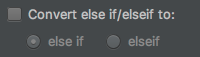
thanks, this helped ! I left the "Force braces" option to "Always" but I checked the option "Special else if treatment", and that's fine for me.
The setting is Editor > PHP > Wrapping and Braces > 'if()' statement > Special 'else if' treatment.
The default setting and amount that this setting is hidden boggles my mind.