When working on a Gradle-based project, is there a way to configure IDEA to use gradle build to build the project rather than javac?

Hi
---
TLDR;
- How to configure IDEA to exclusively use Gradle to build my project (e.g. when pressing ⌘F9)?
- How to add the generated artifacts under build/resources/main to my Run Configuration's classpath?
---
I can select the build task in the Gradle panel to build my project using Gradle and the build artifacts are then stored under the `build` directory.
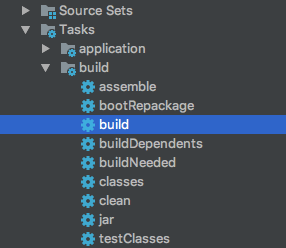
However, if I click on ⌘F9 or Rebuild Project, IDEA does not use Gradle to build the project and also stores the artifacts in the `out` directory.
There's an option to change the Project compiler output path:

But I want IDEA to exclusively use my build tool to build my project anytime IDEA needs to build my project (e.g. before running tests or running my app with ^R).
One problem when IDEA does not use Gradle to build my project is that some generated files don't end up in my class path. For example, the gradle-git-properties plugin generates a `git.properties` file and stores it under `build/resources/main/git.properties` and if I don't use Gradle to build and run my project, as this file does not end up under the `out` dir, it does not get added to the app's class-path and cannot be resolved at runtime.
In the Before launch options panel, I can run the `generateGitProperties` Gradle task, but again the generated files don't get added to the `out` directory:

Any way to configure IDEA to work this way?
Thanks,
Behrang
Please sign in to leave a comment.
See http://mrhaki.blogspot.ru/2016/11/gradle-goodness-delegate-build-and-run.html.