html code fragmented

Hello all,
i have issue with my laravel blade file code,
it might be some invisble white space.
html tags and text are cut , i tried crtrl +alt +L but nothing
please any help
here screenshot:https://nimb.ws/ubgjDW
Please sign in to leave a comment.
Hi,
Sorry, I am not sure if I fully understand what seems to be the issue.
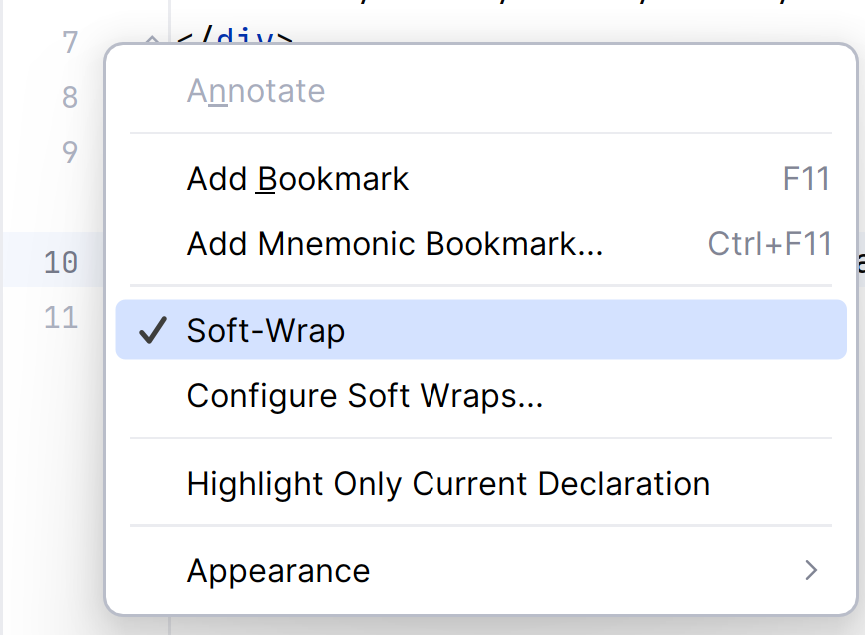
Do you mean that that code is wrapped to the next line? If this is the case, please check if soft wraps are not enabled first. Just right-click on a gutter area (where line numbers are):
hi, thanks for reply
i did the trick " soft wraps " but my issue not solved
from screeanshot: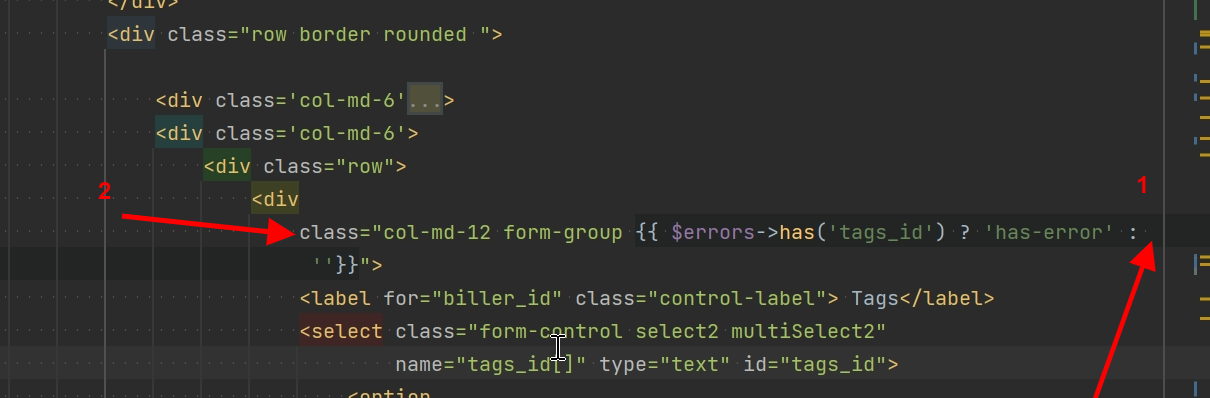
1- the vertical line cut my code to not trailpass
2-each time i put “class ” on same line with the upper “div” and i do CTRL +ALT +L for code reformat it separe “div ” and “class” separating them
Hi,
I was not able to quickly reproduce this behaviour on a similar example.
Would it be possible to share one of the affected Blade files and your code style settings export (Settings/Preferences | Editor | Code Style > Scheme > Export > XML)?