Is there any way to disable search box on commit tab(?)
Answered

Hello, i love to use short-cut of intellij, one thing is that commit on IDE and push to github.
1. Command + 0 to open commit

2. search changes to commit using up and down keys
3. select changes to commit using space
problem is on third phase.
After update 2024.1.3, something like search box appears and it disturbs my action.
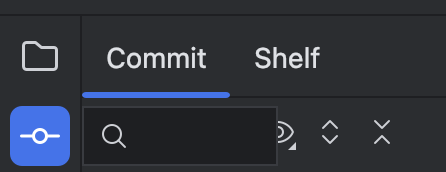
Is there any way to disable it?
Thanks for your help!
Please sign in to leave a comment.
Looks like 'space' is being processed as input, which triggers the search field.
Does it help if you change the shortcut for the "Add to VCS" action to something else under 'Preferences | Keymap'?
Thansk for your information. i'll try this one!
Hi, I tried this one but it doesn't work!
is there any solutions?
Make sure you don't accidentally trigger this action:
Change the shortcut assigned to it if you do.
Thanks for your reply!
But i do not use that short cut at all and of course while using vcs.
Also it seems that something different between my case and find… keys.
if using find..keys, it shows with “Search” placeholder like Picture below
But unintentionally shown search box not having placeholder.
It could be coming from a custom plugin. See if it helps to disable all downloaded plugins and restart the IDE: File | Settings | Plugins | ⚙️ | Disable all downloaded plugins
I tried, but it still doesn't work.
I enabled the presentation assistant to see which keymap was triggered,
but it didn't show anything while speed search was shown.
Hi,
Can you go to Settings | Keymap, click on Magnifying glass and search by “Space”.
Which keymaps do you have assigned to this action?
Additionally, you can enable internal mode: https://plugins.jetbrains.com/docs/intellij/enabling-internal.html
and Double-shift and search for UI debugger, enable it and perform space actions and Show actions window.
Example of me using Space in commit window:
Hello, Thank you for your continued support!
This is the keymap assiged to space and also i enable debug mode!
I captured my actions and nothing logged by ui debugger
I share the link that i recorded
https://drive.google.com/file/d/1Wjo6Hceb4Kp4rea1mO7umoWkoGHLUL5i/view
Whalsrb1226
Please capture more logs:
1. Switch IDE to internal mode (insert line `idea.is.internal=true` to the main menu "Help | Edit custom properties...", and restart IDE)
2. Record the issue with focus debugger on (main menu “Tools | Internal actions | UI | Focus | Start focus debugger”
https://drive.google.com/file/d/1ZFGzXGNVD9gT9WoL7s1HxaXj3nbK21gk/view
Thanks, here is another recording.
Recently i found something. At first i'm from republic of Korea and i can switching languages to type.
When my language is not set on english, this box is triggered.
Can it be fixed?
1. What OS do you have? If Linux, please specify your Linux version, Window manager (Gnome, KDE, etc), and if you have Wayland or x11 (echo $XDG_SESSION_TYPE).
2. What Korean input settings do you use? They are OS-dependent and set up in OS settings.
This is the environment that i'm using intellij
- Apple M1 Max 64GB
- macos ventura 13.5.1(22G90)
nothing shows when echo command
this is the macos keyboard input source('korean two-set keyboard')
And this is the IntelliJ Version that i'm using
I created a ticket IJPL-158652, please upvote to follow the updates.
Thanks for your support, i'll follow this ticket!
Hi guys, Is there any updates?
The current status is reflected in our tracker at the https://youtrack.jetbrains.com/issue/IJPL-158652
Please upvote the issue, this indicates its importance for the users.