ActionScript 3 compile argument shown as error

Hello,
I have custom compile argument: CONFIG:log and it is shown as error.
CONFIG:debug works fine. Both are added to "Conditional Compiler definition" list.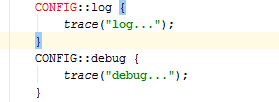
How do I remove it to not be seen a error?
Thank you for your time.
Please sign in to leave a comment.
Please paste contents of the *.iml file that contains this Flash module configuration.
weirdly enough...
CONFIG::standalone works without problems...
Strange. Does Ctrl+click works on 'log' (in CONFIG::log)? Where does it jump?
Is there 'log' function or whatever available in scope? I mean is it possible to write log() or smth similar wihtout CONFIG:: prefix?
Hi, no, I check global scope - nu var of function with same name. I think I have found the source of the problem, but not the reason... it might be bug.
So I have some old modules from long development, and it appears it affects my current module. If I delete those old modules. (seaFightRelease, seaFightReleaseDebug) the problem disappears.
I have created sample project to see the problem: http://mvcexpress.org/temp/project/compArgTest.zip
Thank you for your time.
Thank you for the sample project, the problem is clear now!
You have 3 Flash build configurations in your Flash module. One of them has CONFIG::log in settings, but 2 others - do not. You code will become green if you highlight it according to the seaFightDebug-standAlone build configuration: just select it in the status bar. Or add CONFIG::log to 2 other BCs as well.
Found it, had no idea this option exists... :)
Curiosity question: why would I want code to be highlighted using one configuration, but compile using other?
or.., maybe it's worth switching hightail configuration then build configuration is changed, unless you explicitly change it in the past...
thank you for your time!
> why would I want code to be highlighted using one configuration, but compile using other?
All BCs can be used for compilation, there's no more important or less important, main or secondary BC, IDE can't choose "the best BC" itself to highlight code.
> maybe it's worth switching hightail configuration
No idea what you mean by hightail configuration.