project navigator : how to turn off / remove completely the file icons
Answered

Not certain when this was introduced, but there is currently in the project navigator some icons besides the actual file names, as below;
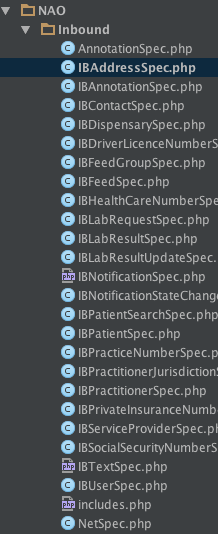
Is there a way to turn that off ? they are refreshed on **EVERY** keystroke, and the constant flicker is distracting (very). This frill is more a boat anchor than a feature for me, and i would like to know if i can turn it off ?
1) did I miss a setting, or alternately
2) is there a 'feature' request to that effect i could upvote ?
regards
Please sign in to leave a comment.
Hi there,
If PHP file has only one entity there (e.g. only single class/interface/trait/exception) then instead of file icon it will be showing that entity icon.
1) That's what people were asking for quite some time (similar to how it's done for Java) -- https://youtrack.jetbrains.com/issue/WI-18878
2) AFAIK there is no such option to turn it off (at lest I do not know, possibly just missed it as well)
3) The flickering -- it's a bug (very annoying one -- https://youtrack.jetbrains.com/issue/WI-32948) -- it's fixed in 2016.3 (you can grab EAP build at any time)
Thanks Andriy. I might just grab the EAP, just to evaluate if my current laptop (best in class at time of writing this) will be able to run a 200 slocs project :).
ps : how do I mark a 'post' as answered ?
>ps : how do I mark a 'post' as answered ?
AFAIK only admins can do that
Other than that: you can prepend "[SOLVED]" or "[ANSWERED]" kind of text to the thread title for now