Cant get Coffeescript file watcher to transpile to JS.

I followed the steps listed here to configure a file watcher on my IntelliJ Idea Ultimate. But no file is getting transpiled. I have tried this for 2 hours now with no luck.
I have tried the following:
- Set output to the same directory as the file (given in help file).
- Set output to a different js directory (given in help).
- Checked the box to transpile with syntax errors as well. Nothing happens.
- Console never opens.
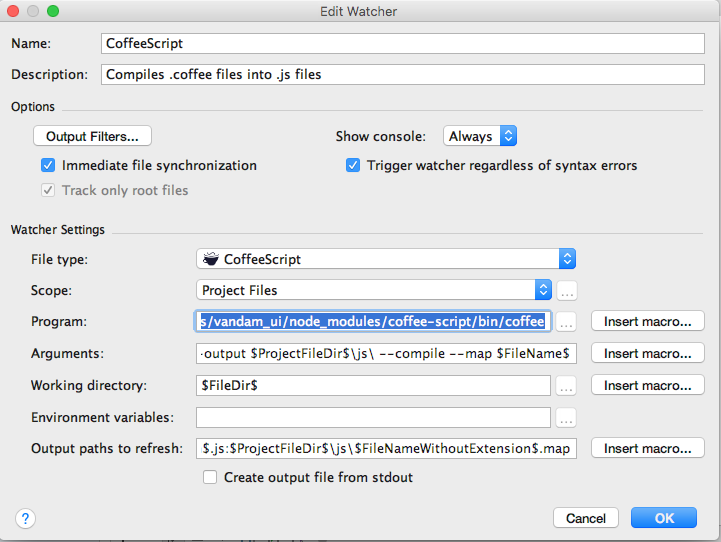
As shown in the image, the complete arguments are as follows
Arguments: --output $ProjectFileDir$\js\ --compile --map $FileName$
Output paths to refresh: $ProjectFileDir$\js\$FileNameWithoutExtension$.js:$ProjectFileDir$\js\$FileNameWithoutExtension$.map
Program: /Users/vsekhri/Projects/vandam_ui/node_modules/coffee-script/bin/coffee
Any help will be appreciated.
Please sign in to leave a comment.
is a file specified in Program field a valid executable? Can you run it in terminal, by specifying same full path, just as you did in your watcher settings?
Like `/Users/vsekhri/Projects/vandam_ui/node_modules/coffee-script/bin/coffee --output /Users/vsekhri/Projects/vandam_ui/js/ --compile --map your_file.coffee`?
Normally coffeescript compiler has to be installed globally (`npm install -g coffee-script`) to be used in command line...
Yes, it worked when I used it in the cmdline like you specified above. A js folder was created in the project folder with the *.js and *.map file created. Are there any logs created to find out why filewatcher is not working?
No, I don't think that logs would help here.
Can you attach screenshots that show coffeescript working in command line?
No ideas then. Please attach your idea.log and screencast that shows your steps