Properly handle d3 Typescript types

When I install d3 Typescript typings through npm install @typings/d3 IntelliJ seems to not recognize the syntax that is used inside those typings. For example, see this screenshot of the index.d.ts:
However, when I in typescript just import d3, the typescript compiler (which is run by my Angular-cli setup) figures everything out just fine. IntelliJ is however unable to autocomplete the d3 types, for the below line it says 'Unresolved variable Primitive'.
For other types (eg @types/node) it works just fine, but they use different syntax in their type definitions (declare module, interface, etc).
Does anyone know if I am missing some plugin or that something else is wrong? I ran out of ideas to fix this.
import * as d3 from 'd3';
let d: d3.Primitive = 'hello';
Please sign in to leave a comment.
Please make sure to upgrade to the most recent Idea version. Global module export declaration (export as namespace), as well as other TypeScript 2.0 features, are only supported since 2016.2.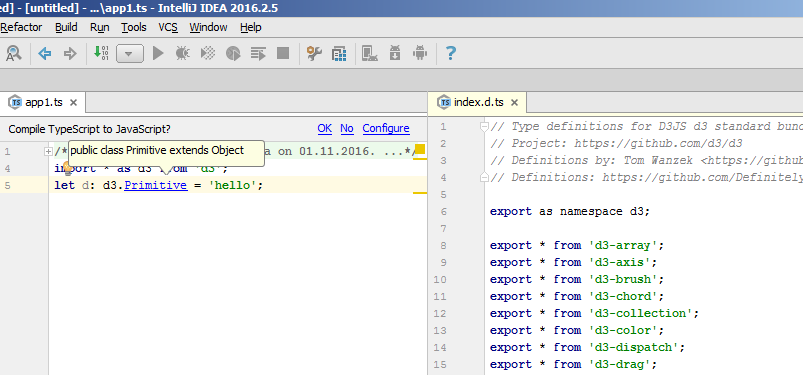
Thanks, updating now :)
Works like a charm indeed, thanks!!
npm install @typings/d3 IntelliJ
should be
npm install @types/d3 IntelliJ