Skeleton generation problems

Whenever I start PyCharm 1.5.1 I get this error message
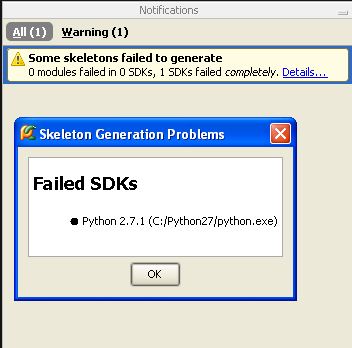
What does this mean? How do I solve it.
Thanks
Attachment(s):
pycharm skeleton generation problem.png
Please sign in to leave a comment.
Hello Örn,
Please attach %USERPROFILE5\.PyCharm10\system\logs\idea.log
--
Dmitry Jemerov
Development Lead
JetBrains, Inc.
http://www.jetbrains.com/
"Develop with Pleasure!"
Hi Dmitry
I've attached the log file. I forgot to mention that this also happened right after I installed 1.5.0 if that helps.
Attachment(s):
idea.log.zip
Hello Örn,
The error is reported because of a timeout (the script to get the list of
binary modules does not complete in 2 minutes). Could you please running
the generator from the command line to check how long it takes?
In order to do so, please go to the "helpers" directory under the PyCharm
installation directory and run:
C:\Python27\python generator3.py -L -s
--
Dmitry Jemerov
Development Lead
JetBrains, Inc.
http://www.jetbrains.com/
"Develop with Pleasure!"
With the -s option I get this : getopt.GetoptError: option -s requires argument
Without it it ran for more then 2 minutes but I was unable to time it precisely.
Here is the actual output if that might help :
1.93
unicodedata C:\Python27\DLLs\unicodedata.pyd
_sqlite3 C:\Python27\DLLs\_sqlite3.pyd
select C:\Python27\DLLs\select.pyd
coltrane.urls C:\dev\python\PyCharm-Projects\django_cms\coltrane\urls.pyc
_msi C:\Python27\DLLs\_msi.pyd
_elementtree C:\Python27\DLLs\_elementtree.pyd
_bsddb C:\Python27\DLLs\_bsddb.pyd
pyexpat C:\Python27\DLLs\pyexpat.pyd
_ctypes_test C:\Python27\DLLs\_ctypes_test.pyd
_tkinter C:\Python27\DLLs\_tkinter.pyd
_multiprocessing C:\Python27\DLLs\_multiprocessing.pyd
_ctypes C:\Python27\DLLs\_ctypes.pyd
_testcapi C:\Python27\DLLs\_testcapi.pyd
_ssl C:\Python27\DLLs\_ssl.pyd
bz2 C:\Python27\DLLs\bz2.pyd
_hashlib C:\Python27\DLLs\_hashlib.pyd
_socket C:\Python27\DLLs\_socket.pyd
winsound C:\Python27\DLLs\winsound.pyd
After running it the error disappears from PyCharm so I guess my problem is solved.
Hello Örn,
Thanks for running the diagnostics! I've filed an issue for this problem:
http://youtrack.jetbrains.net/issue/PY-3898
>>
--
Dmitry Jemerov
Development Lead
JetBrains, Inc.
http://www.jetbrains.com/
"Develop with Pleasure!"
Hi,
So I am also facing the same issue.
2016-01-25 14:09:53,920 [239426677] ERROR - ns.python.sdk.PythonSdkUpdater - failed to run generator3.py for /usr/bin/python2.6: timed out.
com.jetbrains.python.sdk.InvalidSdkException: failed to run generator3.py for /usr/bin/python2.6: timed out.
at com.jetbrains.python.sdk.skeletons.PySkeletonGenerator.listBinaries(PySkeletonGenerator.java:234)
at com.jetbrains.python.sdk.skeletons.PySkeletonRefresher.regenerateSkeletons(PySkeletonRefresher.java:300)
at com.jetbrains.python.sdk.skeletons.PySkeletonRefresher.refreshSkeletonsOfSdk(PySkeletonRefresher.java:130)
at com.jetbrains.python.sdk.PythonSdkUpdater$2$1.run(PythonSdkUpdater.java:155)
at com.intellij.openapi.progress.impl.CoreProgressManager$TaskRunnable.run(CoreProgressManager.java:563)
at com.intellij.openapi.progress.impl.CoreProgressManager$2.run(CoreProgressManager.java:142)
at com.intellij.openapi.progress.impl.CoreProgressManager.registerIndicatorAndRun(CoreProgressManager.java:446)
at com.intellij.openapi.progress.impl.CoreProgressManager.executeProcessUnderProgress(CoreProgressManager.java:392)
at com.intellij.openapi.progress.impl.ProgressManagerImpl.executeProcessUnderProgress(ProgressManagerImpl.java:54)
at com.intellij.openapi.progress.impl.CoreProgressManager.runProcess(CoreProgressManager.java:127)
at com.intellij.openapi.progress.impl.ProgressManagerImpl$1.run(ProgressManagerImpl.java:126)
at com.intellij.openapi.application.impl.ApplicationImpl$8.run(ApplicationImpl.java:365)
at java.util.concurrent.Executors$RunnableAdapter.call(Executors.java:511)
at java.util.concurrent.FutureTask.run(FutureTask.java:266)
at java.util.concurrent.ThreadPoolExecutor.runWorker(ThreadPoolExecutor.java:1142)
at java.util.concurrent.ThreadPoolExecutor$Worker.run(ThreadPoolExecutor.java:617)
at java.lang.Thread.run(Thread.java:745)
at org.jetbrains.ide.PooledThreadExecutor$1$1.run(PooledThreadExecutor.java:55)
I have tried to run the generator3.py -L at the helpers folder and it completes, but definitely much longer than 2 mins. Can we have an option somewhere such that we can set a longer timeout number?