Code signing and avoiding error 65

I have one existing project which works correctly in xCode and Appcode. However if I create a new project in either XCode and Appcode I get the dreaded 'Build finished with Error:65.' plus some detail telling me have a code sign error.
If I go into xCode I can either tell it that I am an 'iPhoneDeveloper' or 'Don't Code Sign' for my new project.
- If I choose iPhoneDeveloper AppCode tells me that the identity doesn't match any valid, non-expired certificate/private key pair in my keychain ( which is true, I don't need to be registered for the work I do)
- If I choose 'Don't Code Sign' AppCode tells me code signing is required for product type 'application'
In xCode it works anyway - it's only AppCode that does not work.
However 'Don't Code Sign' is what I have set in my working project - and I can't see any difference whatsoever. All I know isthat my existing project works, and my new project does not work.
So was I just lucky first time round? - what can I do to make a new project work? My new project can be trivial - it doesn't need to have anything in it. I would expect this issue to hit any newbie who is trying out xCode/AppCode for the first time so is worth solving.
Please sign in to leave a comment.
Tony,
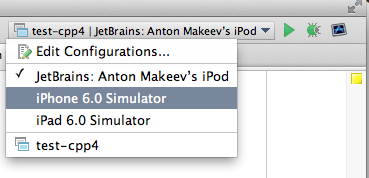
try selecting a simulator in the Run Configurations popup:
Does it help?
Yes
That is the correct answer - I thought I had selected the simulator in xCode but must have missed it.
Thanks again - now I can carry on using your most excellent product!
Tony Eastwood