PyCharm interpreter management

Hello Everyone,
I am testing PyCharm as IDE for my ArcPy needs. I have been testing it on how to set up the interpreters. I am using ArcGIS 10.2.2 with 64 bit background geoprocessing installed, therefore I have two Pythons, one 32 bit and another 64. I understand it shouldnt be a big deal, other than selecting the one you want to use.
Playing around on the project interpreter window I added again the 32 bit one, so its now duplicated. I tried to remove the duplicate, but that would remove both 32 bit interpreter instances. Why is this happening? Can anyone help me to remove this duplicate?
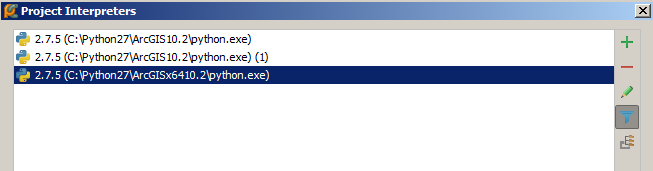

I am testing PyCharm as IDE for my ArcPy needs. I have been testing it on how to set up the interpreters. I am using ArcGIS 10.2.2 with 64 bit background geoprocessing installed, therefore I have two Pythons, one 32 bit and another 64. I understand it shouldnt be a big deal, other than selecting the one you want to use.
Playing around on the project interpreter window I added again the 32 bit one, so its now duplicated. I tried to remove the duplicate, but that would remove both 32 bit interpreter instances. Why is this happening? Can anyone help me to remove this duplicate?
3 comments
Sort by
Date
Votes
Did you try removing them both and then re-adding just the one?
Yes, when you remove any of them, both disappear, and when you re-add python.exe (32bit) they appear both again. Forgot to mention I am using PyCharm Community Edition 4.0.4
anyone?
Please sign in to leave a comment.