Capybara and Selenium not working in Cucumber

Hi,
Boring details: Ubuntu 10.10, FireFox 4.0, RubyMine 3.1, Cucumber 0.10.0, Capybara 0.4.1.2 - i.e. the latest versions of each (I think).
I have some Cuke tests and am adding more. I remember awhile ago (several weeks) that even though I didn't need Capybara to fire up the browser with Selenium, I wanted to see if it would work. I added a @javascipt tag and lo and behold it worked! At least that's what I think happened. (Maybe I was drinking beer instead of coffee that morning?)
Anyway, I just added some JS code that requires Capybara/Selenium to fire up the browser, so I added a @javascript tag before my 'Scenario:' statement in the xxx.feature file and... nothing.
A quick aside/question about adding the tag: the Capybara doc says to add "@javascript" before the "Scenario:" statement, but when I do that all of my tests are skipped because of a "@@javascript" tag. When I just put "javascript", (i.e. without the '@') before "Scenario:" I don't get that error. Nor do I get it if I edit the Run Congurations and set the "Tags Filter" field to '@javascript'. So that's one question: What's the preferred RubyMine way to specify you want to use javascript for a feature test?
Other than that, I don't know if something's broken or I'm just missing some incredibly simple setting. (Or if I was drunk when I supposedly saw this working weeks ago.)
Also, I just realized that what I saw working awhile ago must have been with FireFox 3.x, not the just-released 4.0. Could that be the problem? I have searched this forum and Googled various phrases and can't find anything.
Any ideas?
Thanks,
Larry
Please sign in to leave a comment.
Sorry, seems I don't understand the problem. Probably the above screenshot will help.
Ok, looks like
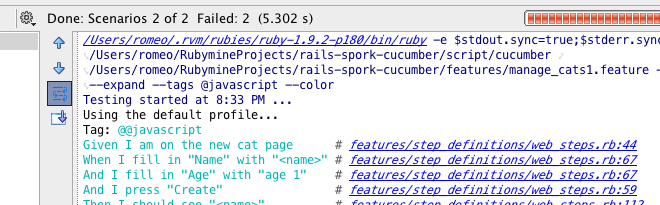
but filtration works, only two scenarios were found, probably some tag name presentation bug.
Hi Roman,
Thanks for the quick response. Sorry for the delay in responding and the not-so-clear original post.
My problems were two-fold:
1) Putting a @javascript tag in my cucumber feature file did not cause Capybara to automatically fire up the browser (via Selenium) like it used to.
2) The @javascript tag itself caused no tests to be run at all; they were only run if I left the '@' off.
I searched the Web a little more and found that Selenium had problems with the new FireFox 4, so I did a Bundler > Update and got a whole slew of new gems, including Cucumber (0.10.2), cucumber-rails (0.4.0), and selenium-webdriver (0.1.4).
That fixed both problems for me.
Thanks again for your repsonse and a great product!
-- Larry
BTW, if anyone else reads this and decides to update their gems, don't forget to fire up the Tools > Run Rails Script dialog box and enter these values: script = rails and
arguments = generate cucumber:install --capybara
This updated several files, including a major change to /features/support/env.rb, which means there's a good chance your updated gems won't work with your old system files.
-- Larry
Better to use "Tools | Run Rails Generator..."
Hi Roman,
You know, I thought I could do that and tried it, but I didn't have Cucumber:Install in the list, just Cucumber:Feature. There are so many options that I figured I must have been thinking of something else.
I just tried what you suggested and didn't see it (again), so I selected and ran Reload generators list and it still doesn't show up. Do you know why?
Thanks,
Larry
Is "include hidden" checkbox is enabled? RubyMine hides this generator if cucumber support already installed in rails app
Nope, but it is now! :)
Thanks, Roman.
-- Larry