Views in Rails Project View

This may be something that I don't understand so I will ask.
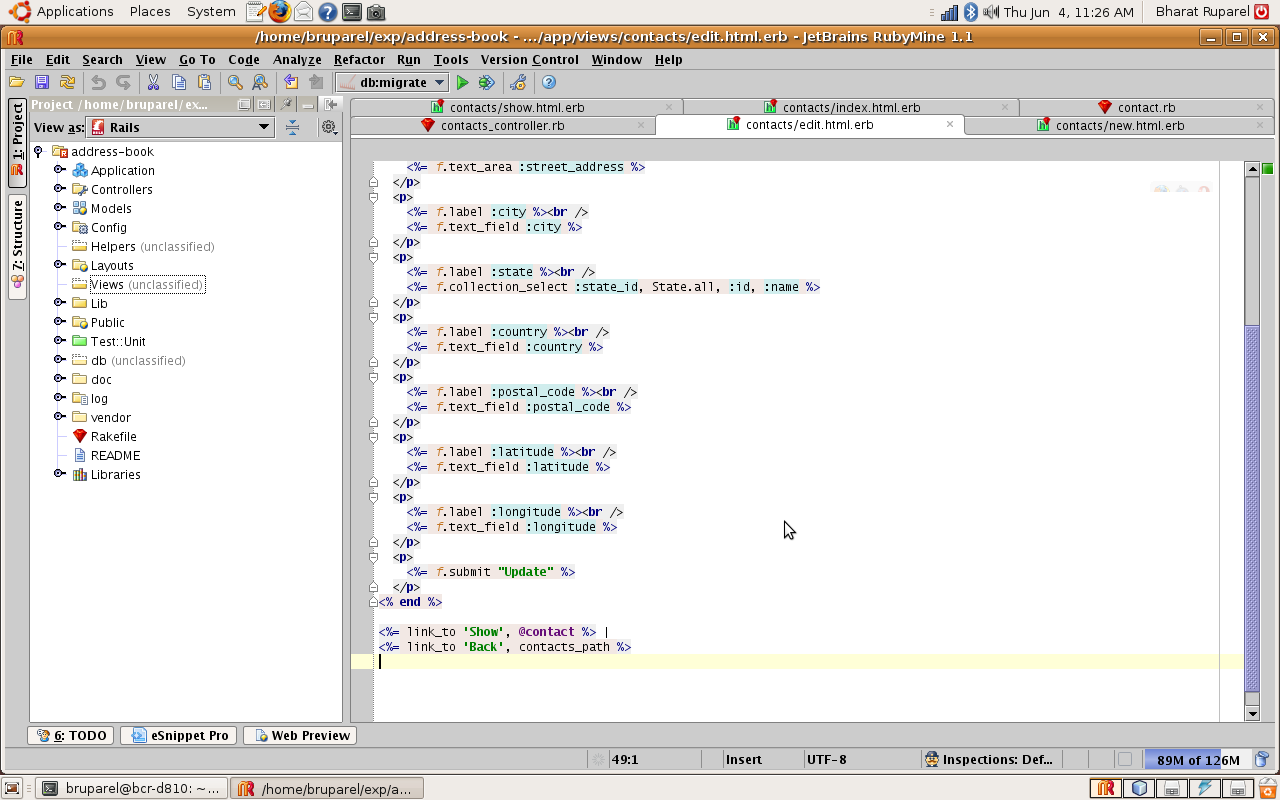
The attached screenshot shows the example application from Thinking Sphinx (Peepcode). You can see that have view for contacts: new.html.erb, edit.html.erb, show.html.erb, index.html.erb open. How it it that a) the Views folder in Rails Project view is empty? and b) it is marked Unclassified?
Bharat
Attachment(s):
Screenshot.png
Please sign in to leave a comment.
Hi,
Rails View - is logical structure view of rails applications. Using naming conventions RubyMine detects views which are related to some controllers/actions and shows them 'under' corresponding action method node. In you case you will find view "edit.html.erb" under Controllers|ContactsController|edit node.
All unclassified views (e.g. from Mailers and some shared views) will be shown in "Views (unclassified)" node.
P.S: If you want to use classic files/folders structure - you can switch to standard Project view (View as : Project)
Understood. I just did not know it.
Thanks.
Comparison of two views on the same project. Notice that for ActiveRecord model classes we also show db fields defined in migrations

(see http://www.jetbrains.com/ruby/features/rails_editor.html)
This is very good Roman. Thanks for pointing out. The model fields expansion is very useful too. The only (consutructive) feedback that I have is that the migrations are currently shown under models. I think a logically better place for them would have been under db, but I am nit-picking.
Bharat