Maven support : generated source folders problem

I have a pom with the following plugin configuration
org.codehaus.mojo
build-helper-maven-plugin
1.0
add-source
generate-sources
add-source
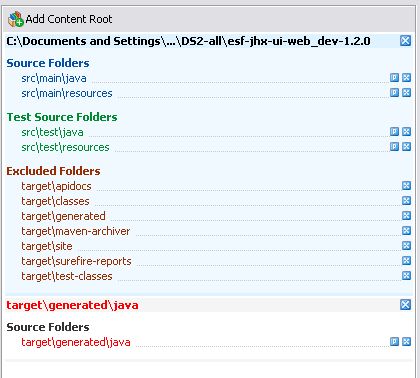
This works nice using CLI maven, but IDEA integration doesn't understand it properly, it creates a new content root, and it basically doesn't add the folder as a source root.
see attached screenshot
Attachment(s):
Clipboard01.jpg
Please sign in to leave a comment.
Thanks, the fix will be availble in the first 7.0.4 eap and 8.0 eap (which will be available today).
As a temporary workaround try putting your generated sources into the 'target/generated-sources' folder.
nice :)
when is 7.0.4 scheduled to be released?
Thanks,
j
I have a similar but different problem. I'm generating source under target/generated-source but Intellij is picking up the source path as including the first part of the package.
So I'm generating 'target/generated-source/com/foo/bar/MyClass.java' and Intellij is adding 'target/generated-source/com' as the source path. This obviously then fails to compile as the package name doesn't match the directory.
I can temporarily fix the issue by changing the source path in my project settings, but this get's reverted back to the above broken path everytime Intellij re-syncs with Maven.
Paul
Paul,
The convention is that under the 'generated-sources' dir there are sub-folders for each plugin that generates the sources. IDEA looks for each sub-folder and adds it as a source folder. It also tries to discover any additional source folders registered by plugins and add it.
This optional step takes place after re-importing and is enabled by default. You may enable and disable this spep in the Maven Settings->Import dialog.
If your sources are generated by some custom task (Ant, for example) you should configure it to place the sources under 'generated-sources/some-sub-dir' folder.
Thanks,
Anton Makeev