AdMob and IntelliJ 14.1

Hi Guys,
I have been lookking through many sites and recommendations on the net to figure out why I can't get a simple android app to work with the newest Google Play Services and AdMob.
I did the steps in the AdMob manual and:
1) Added the google-play-services jar as a dependency
2) Added google-play-services.jar just as a library in Module setting
3) Tried to import it using New -> Module from existing source. This makes IntelliJ break my project.
4) Put google-play-service.jar into my /libs folder.
5) Compile for API level 8, 11, and 13.
When I run the app it gets a FATAL EXCEPTION saying :
Error inflating class com.google.android.gms.ads.AdView
.
.
Caused by: java.lang.NoClassDefFoundError: Failed resolution of: Lcom/google/android/gms/R$stylable;
My imports:
import com.google.android.gms.ads.AdRequest;
import com.google.android.gms.ads.AdView;
My simple onCreate:
@Override
public void onCreate(Bundle savedInstanceState) {
    super.onCreate(savedInstanceState);
    setContentView(R.layout.main);

    AdView mAdView = (AdView) findViewById(R.id.adView);
    AdRequest adRequest = new AdRequest.Builder().build();
    mAdView.loadAd(adRequest);
}
And in my layout:
<com.google.android.gms.ads.AdView
        android:id="@+id/adView"
        android:layout_width="wrap_content"
        android:layout_height="wrap_content"
        android:layout_centerHorizontal="true"
        android:layout_alignParentBottom="true"
        ads:adSize="BANNER"
        ads:adUnitId="@string/banner_ad_unit_id">
</com.google.android.gms.ads.AdView>
So names and namespaces should be correct. I am testing on a Samsung Galaxy 5 and a Nexus 9. Same error.
In pure desperation my next try is to install Android Studio on another machine and se if that works better.
Any suggestions are appreciated.
Please sign in to leave a comment.
Play services should be added as android library module and your main module will depend on it. If you add just a jar file, you are missing the styles, resources and other contents of this package.
Hi Serge,
I tried that under dependencies in Module Settings.
Are you refering to some other way that I missed?
Best regards,
Michael
Maybe you can attach a sample project showing how you have configured google services as android library module in your project?
I had removed all references til google play services and continued writing the rest of the app without any AdMob.
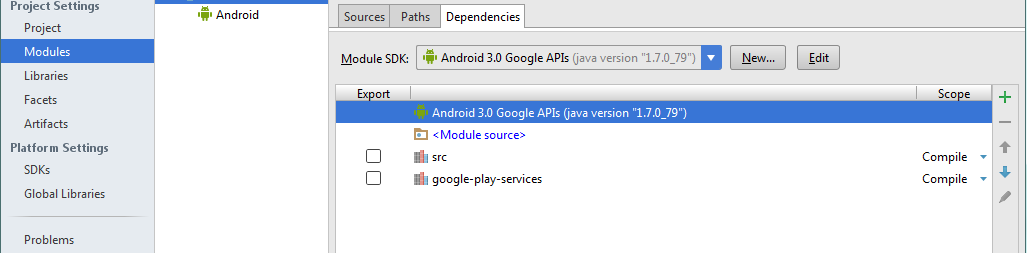
Now I tried to add it again now using the + icon -> Library -> Java -> point to libproject in google play services and set level to Module Library.
I t now looks like this
Had also to add the google-play-service.jar because of compiler errors.
But it still won't build because of missing @integer/google-play-services-version
Sorry, you are not adding a module, you are adding a library which will not work, please refer to these answers:
http://stackoverflow.com/a/17977734/104891
http://stackoverflow.com/a/15826818/104891
Hi Serge,
THAT I didm't try. Thanks A LOT! :)
Now I just get one error:
C:\Program Files (x86)\Android\android-sdk\extras\google\google_play_services\libproject\google-play-services_lib\project.properties___jb_bak___ (Access is denied)
But that's probably because of the path of the sdk and IntelliJ running as a regular user....
Make a copy of C:\Program Files (x86)\Android\android-sdk\extras\google\google_play_services into some other location where you have full write permissions and add it from the new location.
Hi Serge,
Thanks for your help. It was really appreciated! :)
Everything works like a charm now.
Best regards,
Michael