Need help getting IBM Websphere 8.5 (Liberty Profile) setup in IntelliJ

I am having an issue getting Websphere 8.5 setup in IntelliJ on my Mac. It works fine in windows but not on my mac.
Under Websphere Server Settings it is asking to select a sever but nothing comes up. Is there a step I am missing? It finds the installation directory just fine.
Please sign in to leave a comment.
Hello,
1) go to <WebSphere LP home>/bin
2) execute in terminal: ./server create <server name>
<server name> server instance will be created and will be displayed in the IDEA's "Server" dropdown list
Regards,
Michael
I have another strange thing. There is no template for Websphere configuration at all.
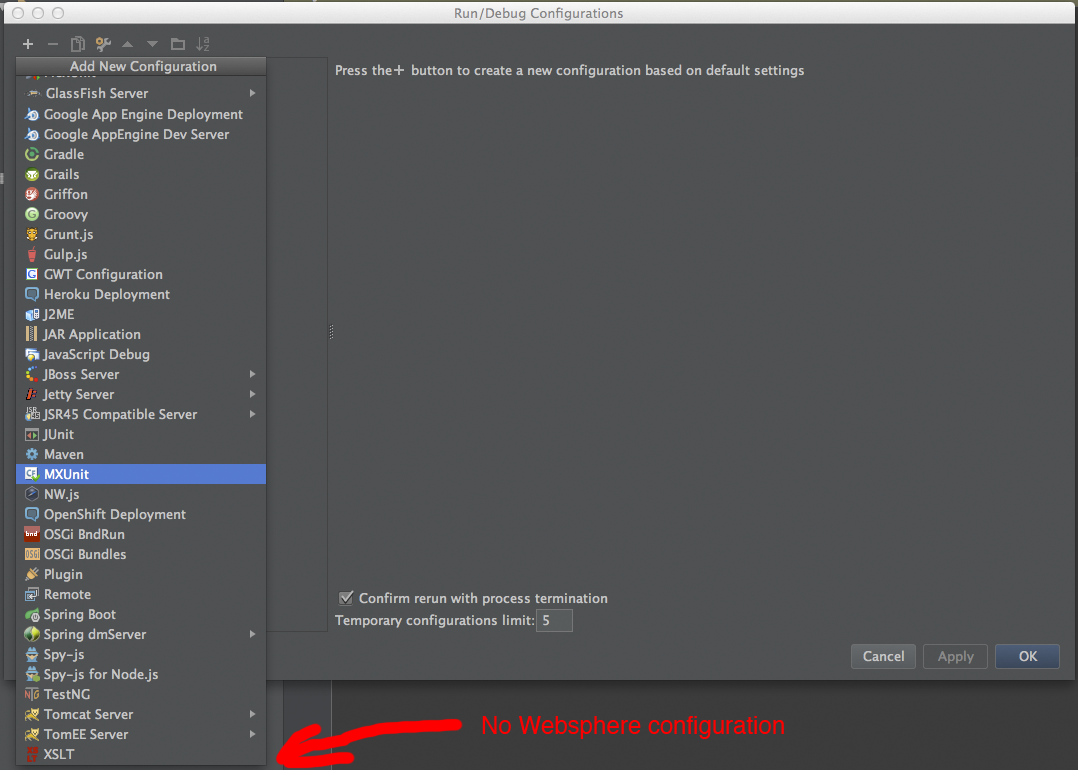
Websphere 8.5.5.5 LP installed and started.
The version of IntelliJ IDEA - 14.0.3.
Any suggestions? Thanks.
Do you have WebSphere integration plugin enabled?
I need to rest :-) I fogot to enable plugin. Thanks, it works.