How to filter solved issues in YouTrack?

Hi,
I just looked at the solved issues of the new build in YouTrack and wanted to see what issues were fixed for the Flex support. When I click the subsystem link and I choose Flex, a tooltip is shown with the number of fixed issues. However when I click "show" no issues are found. The text in the searchbox then reads:
"fixed in: {Maia 92.91} subsystem: {Flex Support}"
Am I doing something wrong or is this a YouTrack issue?
regards,
Christophe
Please sign in to leave a comment.
Hello Christophe,
Neither. :) This filter doesn't show you any results because most of the
issues don't have the subsystem specified.
--
Dmitry Jemerov
Development Lead
JetBrains, Inc.
http://www.jetbrains.com/
"Develop with Pleasure!"
Hi Dmitry,
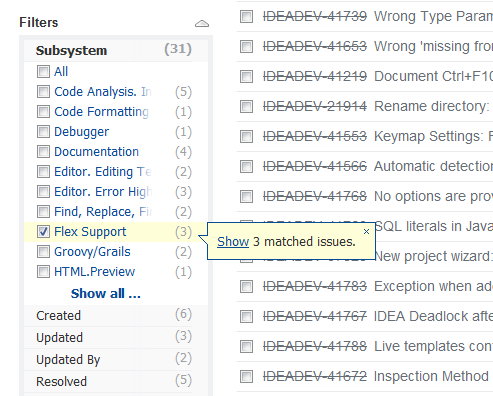
thanks for the quick reply. I find this quite confusing to be honest and it is certainly a usability issue if nothing can be shown.
Please see the attached screenshot. Why does it provide me with a link to show the 3 matches, if it shows none when I click it ;-)
regards,
Christophe
Flex Support subsystem is usually specified correctly. The problem is that such subsystem exists in 3 projects and by default Youtrack takes the wrong one. Please try:
project: IDEADEV subsystem:{Flex Support} fixed in: {Maia 92.91}