How to disable auto reload of project

I'm working on a project where some subfolders are edited by other users. This does not have any effect on what I'm working on. Except that Intellij constantly reminds me to reload the project to see the changes I don't care about.
It is not an option to avoid this by putting subfolders in seperate projects.
So is it possible to disable auto reload of a project or maybe limit it to detecting changes in som folders? I can't seem to find the options for this area.
Please sign in to leave a comment.
It's simple static webproject with HTML and CSS.
It's a standard core intellij dialog.
Actually there is two of them.
One that comes up when the project settings for some odd reason is changed without my knowledge. My co-worker isn't using intellij. So it's only my computer that can change the settings.
The other one comes up when files in general are changed. I know folders with some kind of log/cache could activate this. But I don't care about those either.
In both windows you can uncheck if you actually want to reload(restart intellij).
I'll post a screenshot when I get it again.
Here is a screenshot:
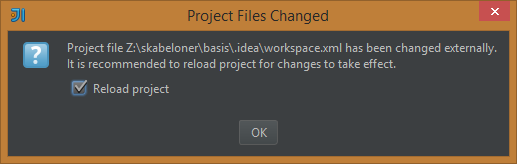
Could you remember, after what actions this dialog appears? Was that update from VCS, or download from FTP, or anything?
Thanks,
Alexander.
The workspace.xml file is where IDEA stores all its information about your current work space such as window positions, open files, etc.
Something is modifying that file or its metadata. Whatever that is, it may just be changing its access datetime or modified datetime and not its content... but something is changing/touching it. If you say your coworkers are not editing it, then something is likely "looking" at it which causes its access time to change. There is no way to disable that dialog since that file should not change (except for in a couple or corner cases, and thus the reason for the dialog). And if it does change, you need to react to it. Since you are using a shared drive of some type, you need to find out what your co-workers are doing so that the file is getting touched. Likely its some tool or utility. See if you can get that tool/utility to exclude/ignore the .idea directory. An Ant or maven build maybe?
Out of curiosity... why use a shared file system rather than using version control so you all have your own working copies?
TY for your input Mark.
We might have a backup tool that is touching it somehow.
You're absolutely right about the version control. I'll try to solve it that way.