how to collapse a class

Hi,
When I have java or php code, I cannot collapse a class, there is no + sign in the gutter. In python however, this does work. Using IntelliJ 134.1007.
Chris
Please sign in to leave a comment.
IntelliJ IDEA only adds folding points at the class level if the file contains more than one class (and each class has some content). For example, here is a file with two classes. Notice it has folding regions for the classes.
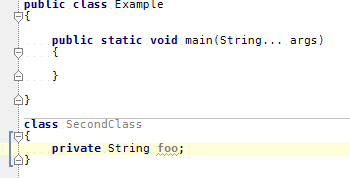
In the long run, this makes sense since a collapsed class (when there is only one class in the file) does not make much sense. In fact it is a small pet peeve of mine that in XML files the root tag is collapsed when you do a collapse all. To me that makes little sense since when would I want to look at just <root ...> in the editor? I care about the nested elements.
If you want, you can manually add the folding to a class either via