IDEA IU 13 running out of memory

I started having my Intellij 13.01 running out of memory. I am prompted with a dialog and I have increased the memory setting to 3072 MB, but it still runs out after 20-60 minutes, and am forced to restart each time. The second and third fields in the dialog (I forget the label) I also increased to 384 MB, and 128 MB.
I do not know of any significant project changes I have done on my end that would have triggered this.
I tried IU-133.609 EA (with included 1.7 JRE), but it appears to do the same.
I updated my java three or four weeks ago to java version "1.7.0_45", but this memory problem only gradually started happening over the last few days.
Is there any logs, settings I can look at that would give me an indication of how I can solve this?
Please sign in to leave a comment.
An additional bit of information is this is running on mac os x 10.9.1, 16 GB ram.
I found this in the logs:
2014-01-17 13:46:41,121 [ 140434] WARN - ution.rmi.RemoteProcessSupport - at com.sun.proxy.$Proxy1.ping(Unknown Source)
2014-01-17 13:46:41,121 [ 140434] WARN - ution.rmi.RemoteProcessSupport - at com.intellij.execution.rmi.RemoteServer.start(RemoteServer.java:79)
2014-01-17 13:46:41,121 [ 140434] WARN - ution.rmi.RemoteProcessSupport - at org.jetbrains.idea.maven.server.RemoteMavenServer.main(RemoteMavenServer.java:22)
2014-01-17 13:46:41,121 [ 140434] WARN - ution.rmi.RemoteProcessSupport - Caused by: java.io.EOFException
2014-01-17 13:46:41,121 [ 140434] WARN - ution.rmi.RemoteProcessSupport - at java.io.DataInputStream.readByte(DataInputStream.java:267)
2014-01-17 13:46:41,121 [ 140434] WARN - ution.rmi.RemoteProcessSupport - at sun.rmi.transport.tcp.TCPChannel.createConnection(TCPChannel.java:246)
2014-01-17 13:46:41,121 [ 140434] WARN - ution.rmi.RemoteProcessSupport - ... 7 more
2014-01-17 13:55:40,834 [ 680147] INFO - s.impl.stores.FileBasedStorage - Document was not loaded for $PROJECT_CONFIG_DIR$/jsLibraryMappings.xml file is null
2014-01-17 13:55:40,852 [ 680165] INFO - s.impl.stores.FileBasedStorage - Document was not loaded for $APP_CONFIG$/dataSources.xml file is null
2014-01-17 13:55:40,855 [ 680168] INFO - s.impl.stores.FileBasedStorage - Document was not loaded for $PROJECT_CONFIG_DIR$/dataSources.xml file is null
2014-01-17 13:55:40,859 [ 680172] INFO - s.impl.stores.FileBasedStorage - Document was not loaded for $PROJECT_CONFIG_DIR$/sqlDataSources.xml file is null
2014-01-17 14:25:31,168 [2470481] INFO - s.impl.stores.FileBasedStorage - Document was not loaded for $PROJECT_CONFIG_DIR$/checker.xml file is null
2014-01-17 14:26:22,072 [2521385] INFO - s.impl.stores.FileBasedStorage - Document was not loaded for $PROJECT_CONFIG_DIR$/cssdialects.xml file is null
2014-01-17 14:26:26,207 [2525520] ERROR - llij.ide.plugins.PluginManager - can't create offscreen surface
java.lang.OutOfMemoryError: can't create offscreen surface
at sun.java2d.opengl.OGLSurfaceData.initSurfaceNow(OGLSurfaceData.java:298)
at sun.java2d.opengl.OGLSurfaceData.access$000(OGLSurfaceData.java:98)
at sun.java2d.opengl.OGLSurfaceData$1.run(OGLSurfaceData.java:324)
at sun.java2d.opengl.OGLRenderQueue$QueueFlusher.run(OGLRenderQueue.java:234)
2014-01-17 14:26:26,209 [2525522] ERROR - llij.ide.plugins.PluginManager - IntelliJ IDEA (Cardea) IU-133.609 Build #IU-133.609
2014-01-17 14:26:26,209 [2525522] ERROR - llij.ide.plugins.PluginManager - JDK: 1.7.0_45
2014-01-17 14:26:26,209 [2525522] ERROR - llij.ide.plugins.PluginManager - VM: Java HotSpot(TM) 64-Bit Server VM
2014-01-17 14:26:26,209 [2525522] ERROR - llij.ide.plugins.PluginManager - Vendor: Oracle Corporation
2014-01-17 14:26:26,209 [2525522] ERROR - llij.ide.plugins.PluginManager - OS: Mac OS X
2014-01-17 14:26:26,209 [2525522] ERROR - llij.ide.plugins.PluginManager - Last Action: EditorCopy
2014-01-17 14:26:41,957 [2541270] INFO - #com.intellij.idea.Main - ------------------------------------------------------ IDE SHUTDOWN ------------------------------------------------------
I tried a File/Invalidate Caches/Restart, but IDEA had problems restarting.
I then deleted ~/Library/Caches/IntelliJIdea13 and attempted to start again. After several failed starts IDEA finally did start but got the following error (which failed trying to send to jetbrains):
Cannot reconnect.: Cannot reconnect.
java.lang.RuntimeException: Cannot reconnect.
at org.jetbrains.idea.maven.server.RemoteObjectWrapper.perform(RemoteObjectWrapper.java:82)
at org.jetbrains.idea.maven.server.MavenServerManager.applyProfiles(MavenServerManager.java:407)
at org.jetbrains.idea.maven.project.MavenProjectReader.applyProfiles(MavenProjectReader.java:369)
at org.jetbrains.idea.maven.project.MavenProjectReader.doReadProjectModel(MavenProjectReader.java:98)
at org.jetbrains.idea.maven.project.MavenProjectReader.readProject(MavenProjectReader.java:52)
at org.jetbrains.idea.maven.project.MavenProject.read(MavenProject.java:573)
at org.jetbrains.idea.maven.project.MavenProjectsTree.doUpdate(MavenProjectsTree.java:543)
at org.jetbrains.idea.maven.project.MavenProjectsTree.doAdd(MavenProjectsTree.java:488)
at org.jetbrains.idea.maven.project.MavenProjectsTree.update(MavenProjectsTree.java:449)
at org.jetbrains.idea.maven.project.MavenProjectsTree.updateAll(MavenProjectsTree.java:420)
at org.jetbrains.idea.maven.project.MavenProjectsProcessorReadingTask.perform(MavenProjectsProcessorReadingTask.java:60)
at org.jetbrains.idea.maven.project.MavenProjectsProcessor.doProcessPendingTasks(MavenProjectsProcessor.java:131)
at org.jetbrains.idea.maven.project.MavenProjectsProcessor.access$100(MavenProjectsProcessor.java:28)
at org.jetbrains.idea.maven.project.MavenProjectsProcessor$2.run(MavenProjectsProcessor.java:107)
at org.jetbrains.idea.maven.utils.MavenUtil$6.run(MavenUtil.java:439)
at com.intellij.openapi.application.impl.ApplicationImpl$8.run(ApplicationImpl.java:420)
at java.util.concurrent.Executors$RunnableAdapter.call(Executors.java:471)
at java.util.concurrent.FutureTask.run(FutureTask.java:262)
at java.util.concurrent.ThreadPoolExecutor.runWorker(ThreadPoolExecutor.java:1145)
at java.util.concurrent.ThreadPoolExecutor$Worker.run(ThreadPoolExecutor.java:615)
at java.lang.Thread.run(Thread.java:744)
at com.intellij.openapi.application.impl.ApplicationImpl$1$1.run(ApplicationImpl.java:150)
Caused by: java.rmi.RemoteException: Cannot start maven service; nested exception is:
java.rmi.ConnectIOException: error during JRMP connection establishment; nested exception is:
java.net.SocketException: Invalid argument
at org.jetbrains.idea.maven.server.MavenServerManager.create(MavenServerManager.java:124)
at org.jetbrains.idea.maven.server.MavenServerManager.create(MavenServerManager.java:65)
at org.jetbrains.idea.maven.server.RemoteObjectWrapper.getOrCreateWrappee(RemoteObjectWrapper.java:41)
at org.jetbrains.idea.maven.server.MavenServerManager$8.execute(MavenServerManager.java:410)
at org.jetbrains.idea.maven.server.MavenServerManager$8.execute(MavenServerManager.java:407)
at org.jetbrains.idea.maven.server.RemoteObjectWrapper.perform(RemoteObjectWrapper.java:76)
... 21 more
Caused by: java.rmi.ConnectIOException: error during JRMP connection establishment; nested exception is:
java.net.SocketException: Invalid argument
at sun.rmi.transport.tcp.TCPChannel.createConnection(TCPChannel.java:304)
at sun.rmi.transport.tcp.TCPChannel.newConnection(TCPChannel.java:202)
at sun.rmi.server.UnicastRef.newCall(UnicastRef.java:341)
at sun.rmi.registry.RegistryImpl_Stub.lookup(Unknown Source)
at com.intellij.execution.rmi.RemoteProcessSupport$2.compute(RemoteProcessSupport.java:230)
at com.intellij.execution.rmi.RemoteUtil.executeWithClassLoader(RemoteUtil.java:167)
at com.intellij.execution.rmi.RemoteProcessSupport.a(RemoteProcessSupport.java:226)
at com.intellij.execution.rmi.RemoteProcessSupport.acquire(RemoteProcessSupport.java:144)
at org.jetbrains.idea.maven.server.MavenServerManager.create(MavenServerManager.java:121)
... 26 more
Caused by: java.net.SocketException: Invalid argument
at java.net.SocketInputStream.$$YJP$$socketRead0(Native Method)
at java.net.SocketInputStream.socketRead0(SocketInputStream.java)
at java.net.SocketInputStream.read(SocketInputStream.java:152)
at java.net.SocketInputStream.read(SocketInputStream.java:122)
at java.io.BufferedInputStream.fill(BufferedInputStream.java:235)
at java.io.BufferedInputStream.read(BufferedInputStream.java:254)
at java.io.DataInputStream.readByte(DataInputStream.java:265)
at sun.rmi.transport.tcp.TCPChannel.createConnection(TCPChannel.java:246)
... 34 more
Also found crash report:
Process: idea [97923]
Path: /Applications/IntelliJ IDEA 13 EAP.app/Contents/MacOS/idea
Identifier: com.jetbrains.intellij
Version: EAP IU-133.609 (IU-133.609)
Code Type: X86-64 (Native)
Parent Process: launchd [272]
Responsible: idea [97923]
User ID: 501
Date/Time: 2014-01-17 15:17:42.404 -0700
OS Version: Mac OS X 10.9.1 (13B42)
Report Version: 11
Anonymous UUID: 2C093963-94DB-CBCE-5F45-424B4B0678A8
Sleep/Wake UUID: D52C37AA-6544-48E4-A628-78700C920BCC
Crashed Thread: 61 Java: ApplicationImpl pooled thread 5
Exception Type: EXC_BAD_ACCESS (SIGABRT)
Exception Codes: KERN_INVALID_ADDRESS at 0x0000000000000008
VM Regions Near 0x8:
-->
__TEXT 0000000100000000-0000000100007000 [ 28K] r-x/rwx SM=COW /Applications/IntelliJ IDEA 13 EAP.app/Contents/MacOS/idea
Application Specific Information:
abort() called
*** error for object 0x127a6ed42: pointer being freed was not allocated
Thread 0:: AppKit Thread Dispatch queue: com.apple.main-thread
0 libsystem_kernel.dylib 0x00007fff89158a1a mach_msg_trap + 10
1 libsystem_kernel.dylib 0x00007fff89157d18 mach_msg + 64
2 com.apple.CoreFoundation 0x00007fff8b8db315 __CFRunLoopServiceMachPort + 181
3 com.apple.CoreFoundation 0x00007fff8b8da939 __CFRunLoopRun + 1161
4 com.apple.CoreFoundation 0x00007fff8b8da275 CFRunLoopRunSpecific + 309
5 com.apple.HIToolbox 0x00007fff8ad54f0d RunCurrentEventLoopInMode + 226
6 com.apple.HIToolbox 0x00007fff8ad54cb7 ReceiveNextEventCommon + 479
7 com.apple.HIToolbox 0x00007fff8ad54abc _BlockUntilNextEventMatchingListInModeWithFilter + 65
8 com.apple.AppKit 0x00007fff9017a28e _DPSNextEvent + 1434
9 com.apple.AppKit 0x00007fff901798db -[NSApplication nextEventMatchingMask:untilDate:inMode:dequeue:] + 122
10 libosxapp.dylib 0x000000011866e6f4 -[NSApplicationAWT nextEventMatchingMask:untilDate:inMode:dequeue:] + 124
11 com.apple.AppKit 0x00007fff9016d9cc -[NSApplication run] + 553
12 libosxapp.dylib 0x000000011866e557 +[NSApplicationAWT runAWTLoopWithApp:] + 156
13 liblwawt.dylib 0x000000011a457ba9 -[AWTStarter starter:] + 873
14 com.apple.Foundation 0x00007fff84e280de __NSThreadPerformPerform + 229
15 com.apple.CoreFoundation 0x00007fff8b8e98f1 __CFRUNLOOP_IS_CALLING_OUT_TO_A_SOURCE0_PERFORM_FUNCTION__ + 17
16 com.apple.CoreFoundation 0x00007fff8b8db062 __CFRunLoopDoSources0 + 242
17 com.apple.CoreFoundation 0x00007fff8b8da7ef __CFRunLoopRun + 831
18 com.apple.CoreFoundation 0x00007fff8b8da275 CFRunLoopRunSpecific + 309
19 com.jetbrains.intellij 0x00000001000019b3 parkRunLoop + 131
20 com.jetbrains.intellij 0x0000000100001858 main + 168
21 com.jetbrains.intellij 0x0000000100001784 start + 52
.... many pages omm
Attachment(s):
idea_2014-01-17-152015_Richards-Retina-MacBook-Pro.crash.zip
I noticed this bug "IDEA-119629 NullPointerException causing crash when switching between two- and single-monitors on OSX" and noticed the out of memory in my log appears to be display related.
I have a dual monitor setup, retina display macbook pro, external 30" display in addition to the laptop display.
Additionally I noticed that once I switched to Oracle JDK7 the IDEA display always comes up first on the retina display and I have to manually move to the cinema display each time. I did not have to do this with IDEA when I was still running Apples JDK6. Also, I have a display layout utility that will arrange app windows using a key shortcut, but I cannot use this with IDEA because it will always be locked up and unresponsive afterward.
In short, all these things seem likely related to Oracle JDK7, IDEA, and retina display (maybe in conjunction with 2nd non-retina external monitor).
I continue to run out of memory, but I notice the dialog has no apparent correlation with the amount of memory IDEA seems to think it has. Notice in the bottom right corner the memory usage IDEA reports which does not seem to match the reported error or the log. Not sure where the out of memory condition is actually generated.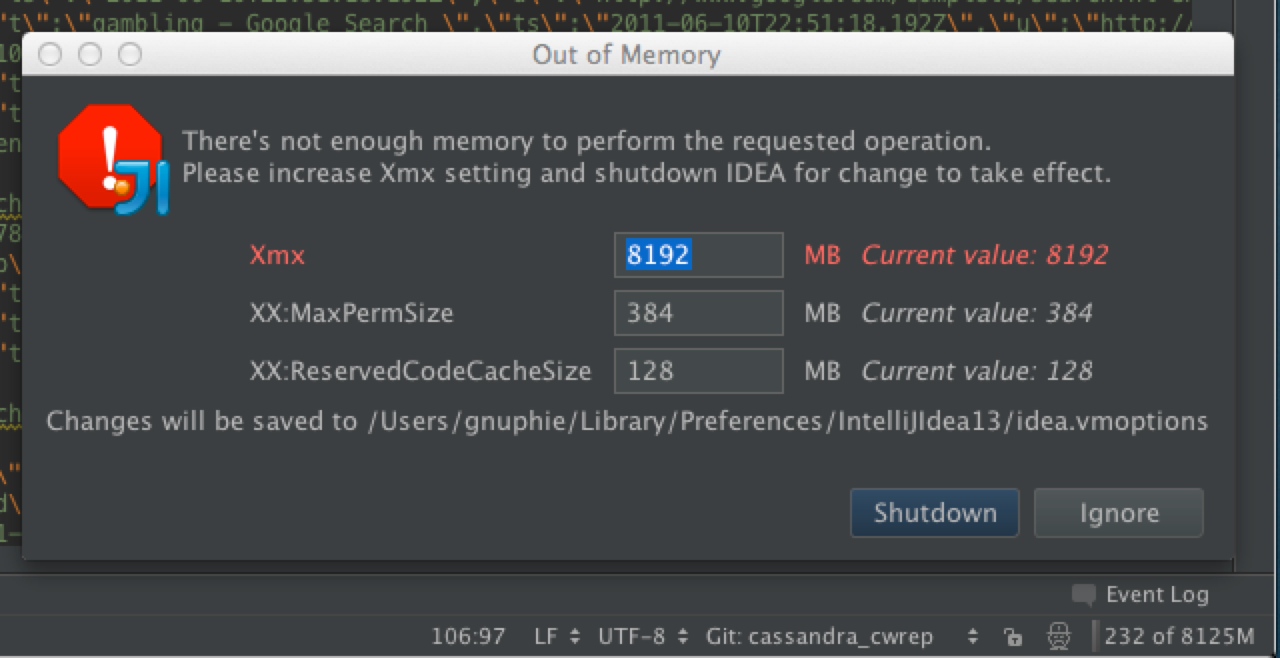
Please follow instructions in
https://intellij-support.jetbrains.com/entries/29983118-Reporting-performance-problems
and create YouTrack ticket
On 1/18/2014 1:45 AM, Richard Dunn wrote:
>
>
>
>
>
>
This appears to be due to IDEA code doing the same as the following:
https://bugs.openjdk.java.net/browse/JDK-7160609
In particular, see the comment:
Even if we constrain the size for a native setBounds request (in the AWTWindow -constrainSize: ), we'll still get an OutOfMemory exception as follows:
Exception in thread "main" java.lang.OutOfMemoryError: can't create offscreen surface
at sun.java2d.opengl.OGLSurfaceData.initSurfaceNow(OGLSurfaceData.java:298)
at sun.java2d.opengl.OGLSurfaceData.access$000(OGLSurfaceData.java:98)
at sun.java2d.opengl.OGLSurfaceData$1.run(OGLSurfaceData.java:324)
at sun.java2d.opengl.OGLRenderQueue$QueueFlusher.run(OGLRenderQueue.java:234)
Looks like 2D code tries to create a surface based on the size of the window as requested by user, not the real, native window size.