Search (Ctrl+F) leaves old searches highlighted

Is this a bug ?
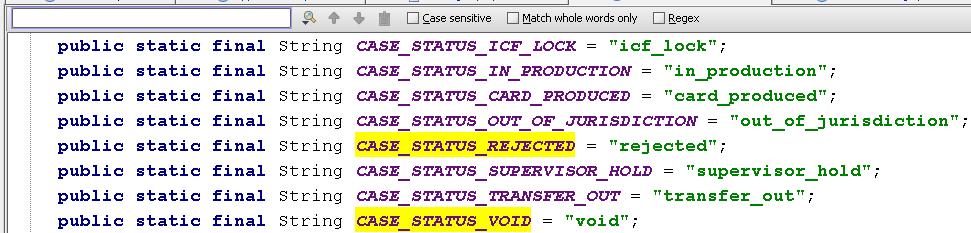
Each time I seach for an item, the previous search items stay highlighted(See attachment).
I am not using wild cards, I tried closing the search bar and reopening but the problem is
still there.
I don't recall this behaving this way before.
Is this a BUG or an annoying feature ?
I am running
EAP Build 7562 Vista, JDK 1.6u3 for IntelliJ SDK
Attachment(s):
multiple search.jpg
Please sign in to leave a comment.
What I'd really like is for multiple searches to be available, each with different colors and gutter marks...
--Dave Griffith
Filed bug with steps to reproduce:
http://www.jetbrains.net/jira/browse/IDEA-16468
+1
I actually like that it leaves the previous searches highlighted until you ]]>, but it would be more effective if it used different colors for subsequent searches.
What I'd like to see is a way to get out of the search dialog with the keyboard. Escape gets out of the find but cancels the highlighting. I would think F4 would be the correct choice since it generally means edit file in other places in Idea.
When I say dialog I meant little bar thing.
On 2007-11-22 11:13:37 +0300, Glen Stampoultzis <gstamp@gmail.com> said:
It's CtrlEnter (or CommandEnter on Macs).
Two things:
1. You don't have to Ctrl-C and Ctrl-V after you've selected the text. Just select what you want to look for and Ctrl-F.
2. If you want to clear the last search, press Esc.
Thanks! I would never have guess that one. I still think F4 would be a more consistent key for that.