How to work with Subversion?

Hi, everyone!
I can't find a way how to setup IDEA to work with Subversion.
What steps I take:
- create new project
- create new module
- create one file in src directory
- set-up VCS for the project - all files/folders are highlighted in red
- menu >> Version Control -> Import Into Subversion
- choose a path in a repository
- click "Import"
- choose my module root and SVN remote folder
- click "ok"
- after that in "changes" tab I can see 2 directories and two "unversioned" files and all imported files are in the repository.
But:
Right-click menu on a file displays all-disabled Subversion menu
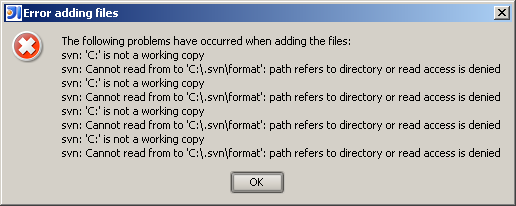
Right-click on "unversioned files" has only one viable option - "Add to VCS". Choosing this option is causing an error. See the attached screenshot.
Any ideas? Is it a bug?
Attachment(s):
svn.bmp
Please sign in to leave a comment.
I found the way. In a weird way, but it's working.
- import my existing project into Subversion.
- close the project.
- create new project
- checkout the code from Subversion
- enjoy
Seems like the algorithm includes too many unnecessary steps.
Any other ideas?
this is not related to IDEA but to subversion.
When you import a folder into subversion, the original folder is not "subversion enabled", you need to check it out from the repository first
It's a feature. Use "Share Directory" instead. Don't remember if it's available for 6.0.5 though.
Yes this is how cvs works too... not surprising seeing as svn's origins
were cvs.
N.
Thibaut wrote:
In article <fc9s3i$h8u$3@is.intellij.net>, nedski@yNaOhSoPo.cAoMm
says...
They need an option to create the admin directories like WinCVS does, so
an import is "enabled."
--
-
David H. McCoy
-
Somehow I feel that's it's not the same as regular check-in, check-out process. And again, the documentation on the topic is very scarce.
Andrey Myatlyuk wrote:
It's the same. You can import your files in subversion in different
ways, but once files are there, doesn't matter how you did it.
Thank you all for the responses. My original idea was correct. I'm going to open a new ticket in JIRA asking to add a checkbox "Enable SVN for this project" in import dialog. Which will do all the steps above. It's a GUI application, not a command prompt for gods sake. It's upt to JetBrains to implement it or not. :)
Not just checkout. Unfortunately, you have to remove all the files in your project first.
the documentation you need is not in IDEA but in Subversion (also available in TortoiseSvn docs if you use it)
see http://svnbook.red-bean.com/en/1.4/svn.intro.quickstart.html
Not just checkout. Unfortunately, you have to remove all the files in your project first.
Hm, isn't "share" an Idea specific feature?
I remember that I wondered what exactly it is supposed to do and was unable to find documentation.
Usually I just play around with features and see what happens, but VCS is the one area where you do not want to do this.
I would say - VCS is one of the features you need to know about and play with it before you do anything.
Yes, it's Idea specific feature in a way that there is no such a command in SVN client. Subclipse uses the same algorithm or at least looks very similar. It's called Share Project. It creates folder remotely (mkdir) checks out it to current project's folder and adds files using "svn add" command. I don't see anything unnatural here. Usually it's very unconvinient to use "import" because it imports everything and you can't skip specific files. I don't know if Idea does the same, but should do something similar.
Hello Andrey,
You should use the "Share Directory" action on the module root context menu
instead. This replaces the two step import/checkout procedure.
--
Dmitry Jemerov
Software Developer
JetBrains, Inc.
http://www.jetbrains.com/
"Develop with Pleasure!"
Hi Dmitry,
How about "Share(ing) Directory" for whole project? It's annoying if project contains several modules and I need to repeat sharing process for each.
I am just getting started on a new project. I have files on my local desktop. Using Version Control (top menu) --> Import into SVN, I now have all those files in SVN. So that's good.
However, I am unable to figure out how I map my Subversion server to my local working directory. I am also unable to perform basic tasks like checkout. I have attached a file with two images so you can see for yourselves what is going on.
The first shows what is going on at the IDEA module level on my local computer.
The second shows what is going on in the SVN Repositories window in IDEA at the SVN server level.
Please let me know how I can make those disabled items available.
Thanks.
Attachment(s):
svn_images.doc