Directory '/bea' is not BEA home

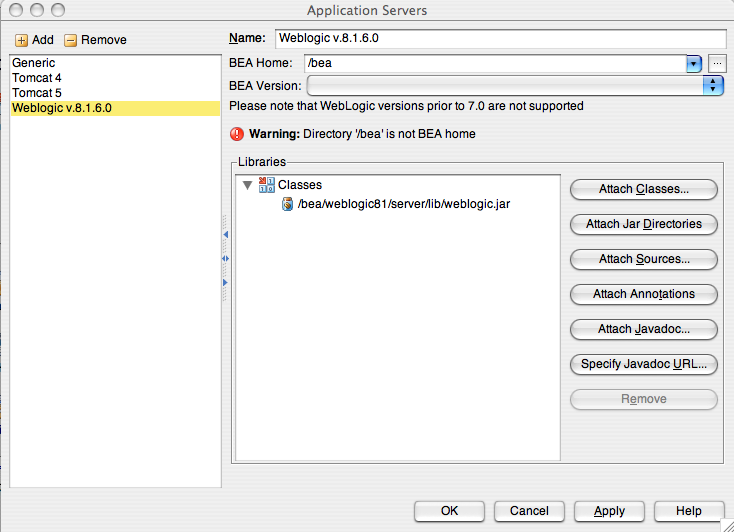
I went into the config panel/application servers to setup Weblogic 9.2 which I installed and noticed that my previously existing Weblogic 8.1.6.0 is now getting an error message: Directory '/bea' is not BEA home
I can't make any changes or additions to the Applications Servers because when I hit "OK" the error pops up again. If I cancel then the existing Weblogic 8.1.6.0 works fine. But whenever I go to make changes/additions I can't because BEA home isn't recognized.
I'm using the lastest EAP build and I'm not sure when the problem started as I don't go into Application Servers settings very often.
my /bea directory looks like this:
$ ll /bea
-rwxr-xr-x 1 krsmes admin 826 Aug 21 11:57 UpdateLicense.sh
-rw-rr 1 krsmes admin 35862 Aug 21 11:57 license.bea
-rw-rr 1 krsmes admin 10467 Feb 14 2007 license_scale_limited.bea
drwxr-xr-x 4 krsmes admin 136 Aug 21 11:43 logs
drwxr-xr-x 146 krsmes admin 4964 Aug 21 11:56 modules
-rw-rr 1 krsmes admin 16124 Aug 21 11:57 registry.dat
-rw-rr 1 krsmes admin 1350 Aug 21 11:57 registry.xml
drwxr-xr-x 6 krsmes admin 204 Aug 21 11:47 user_projects
drwxr-xr-x 5 krsmes admin 170 Aug 21 11:58 utils
drwxr-xr-x 6 krsmes admin 204 Feb 15 2007 weblogic81
drwxr-xr-x 10 krsmes admin 340 Aug 21 11:43 weblogic92
drwxr-xr-x 12 krsmes admin 408 Aug 21 11:57 wlserver_10.0
I'm on Mac OSX.
any ideas?
Attachment(s):
Picture 1.png
Please sign in to leave a comment.
So, I guess IDEA does not support Weblogic on Mac OSX anymore then?
I got this problem also!
Is there any solution?
/Thomas
i guess i'll report it as a but when i get a chance... no response here.
Hello k,
IDEA expects to find the following elements and attributes in /bea/registry.xml:
... ... ]]>
Does your registry.xml correspond to this template?
here is my /bea/registry.xml
]]>
Thank you for your help.
(Yes it is still happening in build 7274)
Message was edited by: k
k
Hello k,
Will be fixed in next Selena EAP build.