Create File by Template Issue?

Hi, I'm new to IntelliJ IDEA, and I just created a template for my computer science course I'm taking. I am following the guidlines in the help file:
On the context menu of the destination package, choose New, or press Alt + Insert
Select the desired file type
I don't see the template file that I've created. Here is what I've done:
What am I doing wrong? I know this is something really basic, but I want to get this to work.
Thanks.
Please sign in to leave a comment.
There was a bug about this: http://youtrack.jetbrains.net/issue/IDEA-63535. Appearantly, they have hidden that functionality under other menu.
Even by following those directions, I don't see the option to "create Java Class":
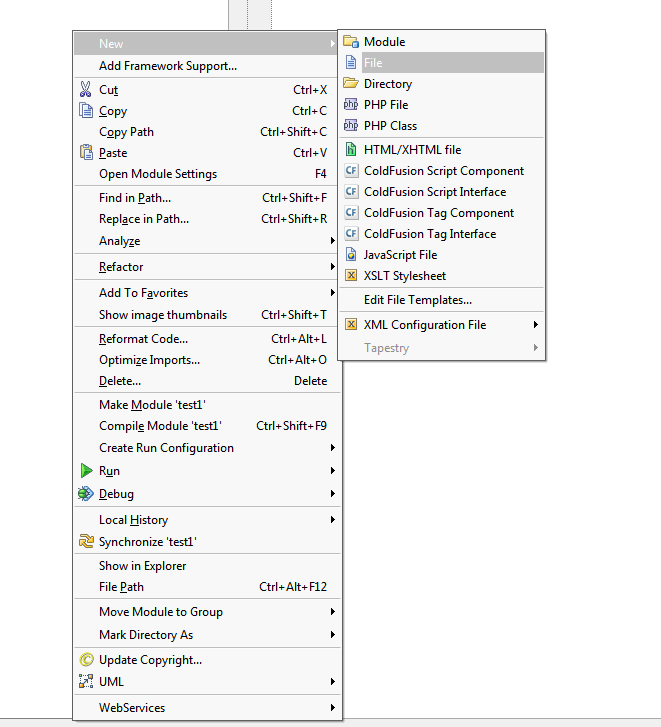
What am I doing wrong?
Hi.
Most likely you're trying to create java class not under source root. Please, check you module properties in the Project Structure dialog.
Regards,
Alexander.
Can you describe this process, please? As a new user, I am having a hard time following those directions.
I have solved the problem. I will walk you through the steps so that other beginners like me do not get stuck on the same thing. Please note that each corresponding picture is below the corresponding text:
5. Right-click on the "src" folder and select Java Class. Once you have chosen an appropriate name for your class, then select your template in the dropdown menu. You're done!
Yes, great. That's what I meant.
Regards,
Alexander.