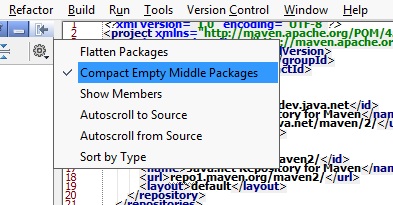
Small ?: uncollapse directories in project structure

hi
I've noticed when creating packages /directories that do not contain any elements at interior levels that those levels get 'skipped' in the Project Viewer.
often i do not want that behavior. Is there a way to change it ?
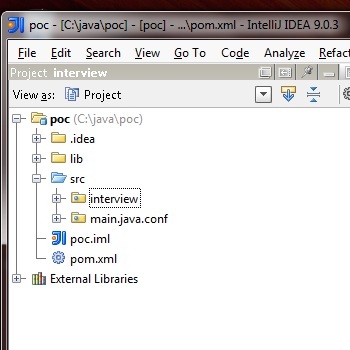
e.g. see screenshot: I want to move the "interview" package into the main.java package. But I can not. Why? It gets hidden and only its child "main.java.conf" is available.
Attachment(s):
x.jpg
Please sign in to leave a comment.
just disable collapsing of empty packages
this option either on 'Project View'->'configure button' or somewhere in global settings
Thx for that tip. I wish those options on clicking the icon were also navigable via menu options. I find it distasteful to need to click on all the icons to find things.