Code Reformatting option "Keep ')' and '{' on one line" doesn't work anymore

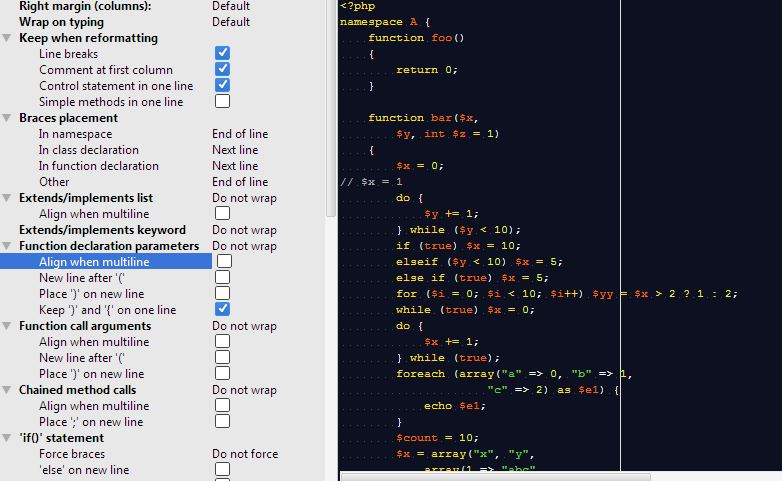
...even in the settings menu enabling or disabling the option "Keep ')' and '{' on one line" doesn't give the desired result. It even doesn't work in the preview window on the right (see attached picture)
Am I doing something wrong or is this a bug?
function foo()
{
return 0;
}
should be:
function foo(){
return 0;
}
after reformatting with the option enabled, but it doesn't do this.
Attachment(s):
Capture.JPG
Please sign in to leave a comment.
*bump*... I'd love to get this fixed... Since I upgraded to phpStorm 10.0.1 my code doesn't look the way I'm used to... this is something that normally should be working, right?
Hi there,
As far as I'm concerned I do not see any bug here -- it works accordingly to your settings (based on your screenshot only).
I believe this option has nothing to do with your case. It is about function parameters ... but you have none. Try "Braces placement -> In fucntion declaration" instead.
No, it doesn't work according to my settings.
I'm changing the settings for a function declaration, with or without function parameters. So instead of this:
function test( $a, $b )
{
return $a < $b;
}
I want this:
function test( $a, $b ){
return $a < $b;
}
so that means I want to "Keep ')' and '{' on one line", right? This is how things used to work as well...
Ok.
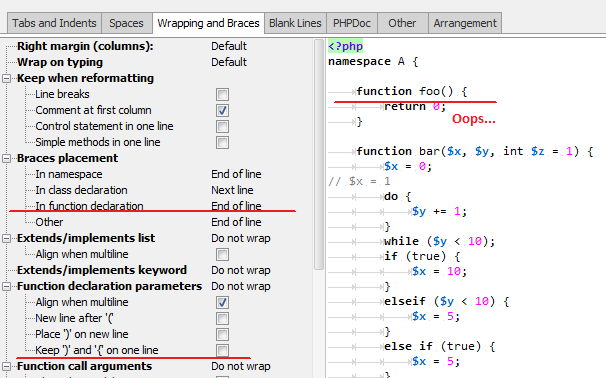
I humbly stand corrected... No bug indeed, but a huge oversight on my part... Sorry for that and thanks for pointing it out... twice...