Problems debugging mocha tests

I am trying to debug mocha tests
Debugger steps into first line of mocha/bin/_mocha
program = require('commander')
and stops on the deepest level.
After Resume Progam the same thing on following lines:
Mocha = require('../')
runner = mocha.run(program.exit ? process.exit : exitLater);
Resume program again -> debugger stopped again on while(current.isInternalNode){: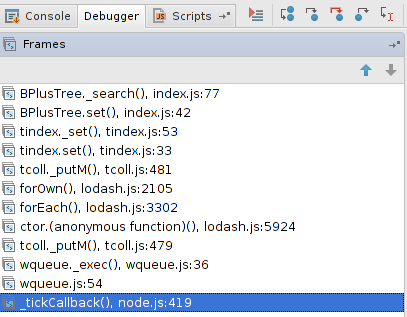
and so on (20..30 times).
Mocha Run/dung configuration:
Node interpreter: /usr/local/bin/node
Node options: None
Working dir:
Mocha
Used versions:
mocha 2.1.0
Node,js 0.10.30
Webstorm 9.0.3 on Ubunu
Please sign in to leave a comment.
can't recreate. Can you attach a screenshot of your run configuration? test project would be very helpful, of course
I have attached test project and mocha test configuration
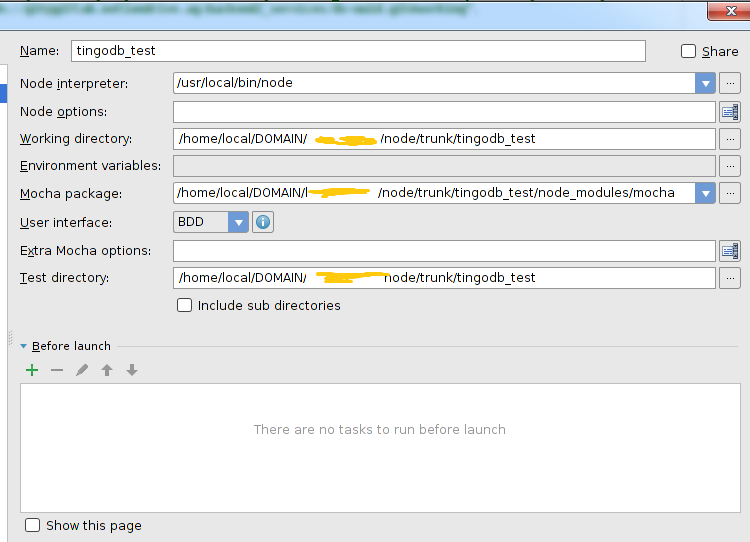
As I mentioned problem could be depends on Node.js modules used by project.
Is you can I can also russian:
Во вложении скриншот и файлы Node.js проекта. Там отладчик произвольно останавливается больше 10 раз (дальше не считал).
Если удалитъ использовыые Node.js билиотеки tingodb@0.3.4 и async@0.9.0, то отладчик останавливается только 2 раза, а потом все нормально. Никаких Breakpoints не было установлено.
В самом начале разработки такой проблемы не было.
Проблема впервые обнаружена, когда я начал использовать LevelDB (https://www.npmjs.com/package/levelup)
Проблема возникает для всех проектах (в т.ч. и новых).
Зы. Какие settings нужно экпортировать (или какие части файла workspace.xml), чтобы вы могли воспроизвести ситуацию?
Attachment(s):
tingodb_test.zip
2015-02-12 01 Webstorm First Break Console Tab.png
Can't reproduce using your files:( Can you create a new project and copy files you have attached to this project - does the issue persist? What Node version do you use?
Please also try creating a Node.js run configuration for running mocha, like:
javascript file: node_modules/mocha/bin/_mocha
application parameters: test.js
and debug it - does the problem persist?
This problem (and probably also another problems with debugger/breakpoints) can be solved with File -> Invalidate Caches / Restart :
https://www.jetbrains.com/webstorm/help/cleaning-system-cache.html