PHPStorm 8 + Symfony2 and Exception error linting

Hi,
this is my first and I am desperately frustrated, because my project is showing errors during commits even though there are no errors :( This issue is old and I want to have it resolved, as it bugs me
in Symfony2 I have following:
throw $this->createNotFoundException('Exception description'); which shows an error in PHPStorm:
the thrown object must be an instance of the Exception.
Which it obviously is ...
and thus rendering my whole project "BAD" ... that sucks a bit from a IDE of this quality ...
any help?
Please sign in to leave a comment.
Hi there,
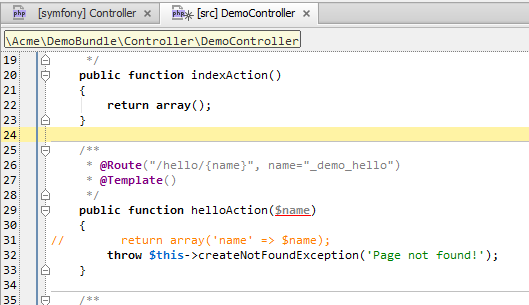
Please provide a bit real code (more code) -- not just a single line.
If I add such line into an empty action .. it shows no errors at all (phpStorm 8.0.2 EAP build).
Also -- what do you see when you invoke Ctwl+Q (View | Quick Documentation) on "createNotFoundException" in such line (screenshot)? What return type it has?
But before doing that: please try "File | Invalidate Caches..." and restart IDE.
Hi, my problem image is in the attachment (can't embed it due not getting anything when clicking on the camera icon in wysiwig editor)
CTRL+Q before cache invalidation:
public function Controller::createNotFoundException($message = 'Not Found', \Exception $previous = null) Symfony\Component\HttpKernel\Exception\NotFoundHttpException
after cache invalidation it is no problem.
But is it impossible to fix it otherway ?
Attachment(s):
error.png
So ... as I understand invalidating caches helped.
If that's so -- then it was the right move -- you have had indexes out of sync / corrupted for some reason (e.g usually happens after upgrading IDE from one version to another).
Plus, on your screenshot I see that @throws NotFoundHttpException is highlighted as unknown class. If it's now gone.. then once again, invalidating caches was the right move.
yeh. Question is, why it was highlighted as bad in the first place and how to prevent from getting into it ?
As I have already mentioned, usually such thing happens after upgrading IDE to the newer version -- sometimes indexes going out of sync.
It may also happen because of crash or improper shutdown (be it IDE or computer overall).
The "Invalidate caches" is the "official" (if I may use such term here) way of fixing it -- indexes/caches are temp things and need to be refreshed from time to time anyway.