Using PhpStorm w/CakePHP: Can't get navigation to Class to work

Consider the following code in a .ctp file in CakePHP:
<td><?php echo h($publication['Publication']['publication_id']); ?> </td>
<td><?php echo h($publication['Publication']['publication_name']); ?> </td>
<td >
When I use Netbeans and hover over the 'h' function and click Navigate->Go to Declaration, this elicits a new window bringing up the detail code in that particular controller.
I thought that PhpStorm did the same thing by hovering and pressing the command-B (on Mac). Apparently this does nothing. I have gone in and added .ctp to the PHP list of file types but still no joy.
Can someone guide me to being able to xref these classes? It' hate to think that I can't do this in PhpStorm(costing $200) and you can in Netbeans (costing $0)!
Thanks!
Please sign in to leave a comment.
Hi there,
I'm not a CakePHP user, at all. I do not know what that h() function does, how it is declared and where it is located (if it's part of framework). I may only say that navigation works just fine in PHP files.
Therefore:
1) Please show a screenshot of such file -- maybe h() is highlighted in some way which tells that IDE does not know what that function is (for whatever reason).
2) Please try "File | Invalidate Caches..." in case there were some glitches since previous version upgrade or non-clean shutdown
3) If nothing -- would be good if you provide some very basic standalone project that can reproduce the issue (basically, a framework + those few extra files) so that I can try it here on my computer (zip whole project folder and attach here).
OK so the first image here shows the view.ctp in a Netbeans IDE. I have placed the cursor over the function h, and right clicked. Then I choose Navigate and then Go To Declaration.

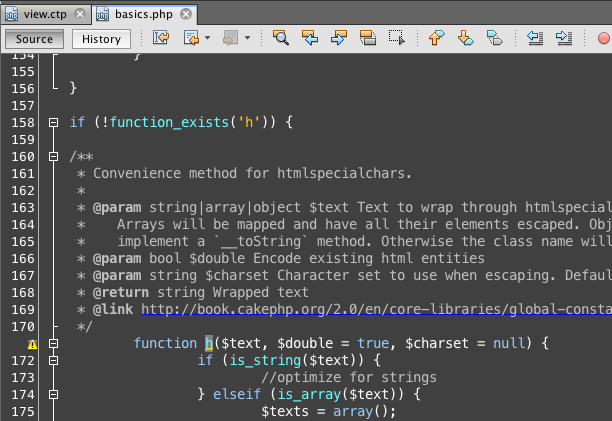
Once I do that, then NetBeans editor seems to know that function h is in a program called basics.php and then loads it up and highlights it:
Hopefully this helps. I just want to do the same thing in PhpStorm.
Thanks!
It's all fantastic .. but I need info from PhpStorm and not Netbeans.
There's no information to give. If you perform the same thing in PhpStorm, nothing happens. Absolutely nothing.
If there is something specific you want, I'll try to provide it.
Thanks!
OK Here's what you start with Netbeans. The code is view.ctp. The ctp is a cakePHP template file. I indicated in NetBeans that the ctp file acts like a php file. Then I simply hovered over the h function (see the <?php echo h), and right clicked. This gives me the Navigate and I choose Go To Declaration
![]()
![]()
When I click that option the IDE loads basics.php from the system. Note that it opens that in a separate window. I hope this helps. I'd like to get PhpStorm to do the same thing when I hit command-B. As you can see command-B is the shortcut for NetBeans, too.
OK Here's what you start with Netbeans. The code is view.ctp. The ctp is a cakePHP template file. I indicated in NetBeans that the ctp file acts like a php file. Then I simply hovered over the h function (see the <?php echo h), and right clicked. This gives me the Navigate and I choose Go To Declaration
![]()
![]()
When I click that option the IDE loads basics.php from the system. Note that it opens that in a separate window. I hope this helps. I'd like to get PhpStorm to do the same thing when I hit command-B. As you can see command-B is the shortcut for NetBeans, t
OK Here's what you start with Netbeans. The code is view.ctp. The ctp is a cakePHP template file. I indicated in NetBeans that the ctp file acts like a php file. Then I simply hovered over the h function (see the <?php echo h), and right clicked. This gives me the Navigate and I choose Go To Declaration
![]()
![]()
When I click that option the IDE loads basics.php from the system. Note that it opens that in a separate window. I hope this helps. I'd like to get PhpStorm to do the same thing when I hit command-B. As you can see command-B is the shortcut for NetBeans, t
OK Here's what you start with Netbeans. The code is view.ctp. The ctp is a cakePHP template file. I indicated in NetBeans that the ctp file acts like a php file. Then I simply hovered over the h function (see the <?php echo h), and right clicked. This gives me the Navigate and I choose Go To Declaration
![]()
![]()
When I click that option the IDE loads basics.php from the system. Note that it opens that in a separate window. I hope this helps. I'd like to get PhpStorm to do the same thing when I hit command-B. As you can see command-B is the shortcut for NetBeans, t
Really?
You can start with providing a screenshot of how that *.ctp page (especially the place where h() function is used) looks in PhpStorm. Because I would like to see the same what you see there on your screen.
Well ... here is the difference -- it works just fine here.
My suggestions:
Thanks! I will try that in my version, though I have 7.1.3.

Here is what it looks like in PhpStorm:
Indeed on the Mac it's a Command-Click and that does do exactly what Netbeans does...it opens the basics.php file. I just haven't seen that shortcut before.
Perfect! Thank you!