Remove background from Html tags

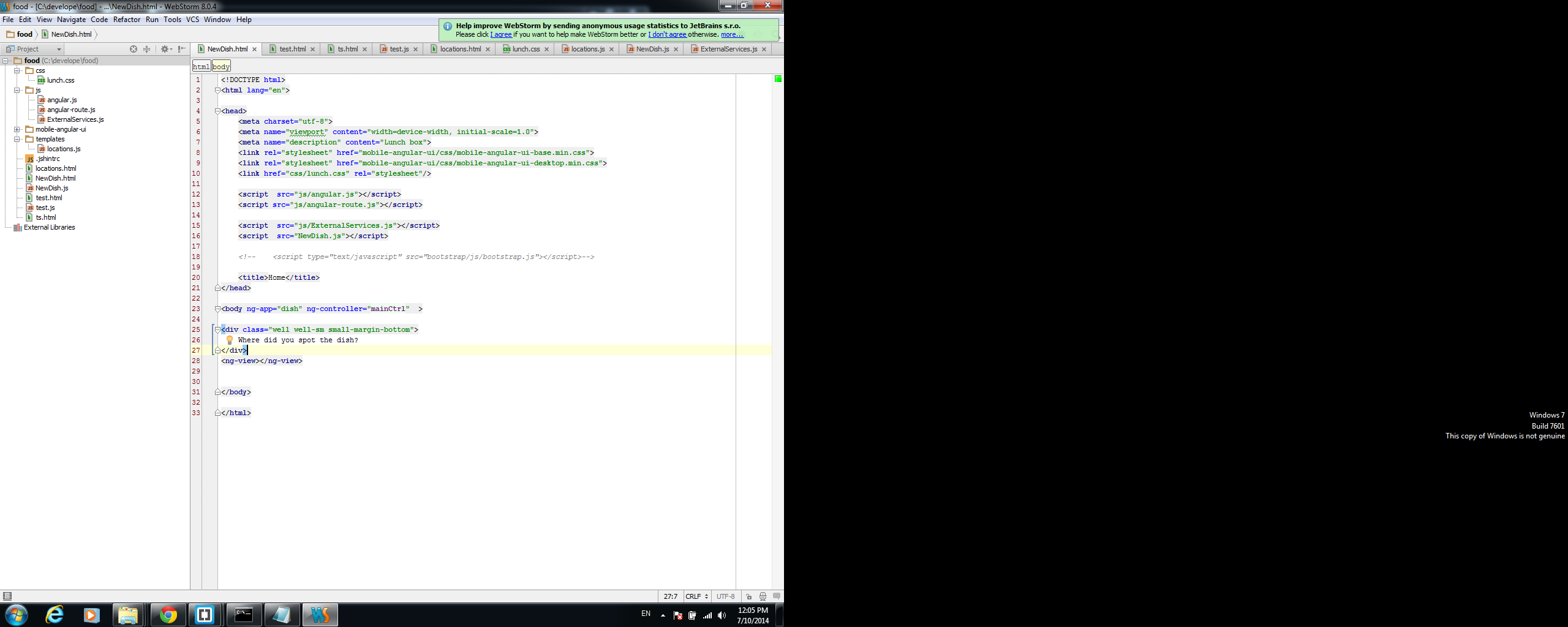
I want to remove the gray backrgound for Html tags, in the Editor.
Show is pitcrure
How to do?
Attachment(s):
Untitled.png
Please sign in to leave a comment.
I want to remove the gray backrgound for Html tags, in the Editor.
Show is pitcrure
How to do?
Please sign in to leave a comment.
Hi there,
Settings | Editor | Colors & Fonts | HTML
"Tag" style should be the one you are after.
P.S.
If you are using bundled Default color scheme without modifications ... you have to create a copy first in order to modify it ("Save As..." button)
I point on Tag, but backgraound checkbox is disabled.
Attached is photo of it.
Attachment(s):
Untitled.png
You should uncheck "Inherit Attributes from" option -- this will make this style editable. Otherwise it inherits styles from styles defined in "Language Defaults" section
I do as you say.
For some reason my selection is not being saved.
Every time I press apply my selection changes get reversed.
What do you mean by "my selection changes get reversed" ? Can you illustrate it somehow?
What style/color have you applied?
As I understand you just unchecked "Background" .. is it correct? If so -- then yes, it gets reset as not a single option is applied .. so IDE reverts all back (it's stupid, but this is how it currently works).
Solution -- leave it checked but apply "white" background color. Or just alter color/uncheck that in "Language Defaults" -- "Markup tag" style -- will be applied to ALL of such styles (in all languages).
Thanks. that works.
To be honest I find the default appearance uneasy for the eyes, and to distinguish between taks/ attributes.
I got used to sprint brakets and think it is much better and more pleasant.
I attach an image
Attachment(s):
Untitled.png
Well .. PhpStorm comes with few predefined editor schemes.
P.S.
Have you tried Darcula theme (both editor and whole GUI) -- maybe you will like it?
I have found a website with many themes.
I have downloaded the visual studio theme, and it is much better for me.
Thanks!
In newer versions the option is in Editor | General | Appearance | Enable HTML/XML tag tree highlighting (turn this off).