Я согласен - что IDE - делает здесь все правильно.
Но мне надо, что бы на многострочные переменные IDE d *.js не ругалось. У меня JavaScript выполняется на сервере, и у сервера это за ошибку не считается.
As far as I'm aware it's not possible as such check is done on low (parser/lexer?) level and not as individual inspection and therefore such error cannot be disabled/suppressed.
Unless, maybe, this file can be associated with that another JS flavor (if it's supported by IDE, of course) where that is not treated as an error (sorry, just a thought -- not a pro in JS so just a wild guess).
As Andrey has mentioned, this check is performed on low level and can't be turned off. I can only suggest turning error highlighting off for such files - can be done using Hector icon in the lower right corner: open your file in editor, click the Hector icon and then move the slider to change the Highlighting level to 'None' See http://www.jetbrains.com/webstorm/webhelp/changing-highlighting-level-for-the-current-file.html

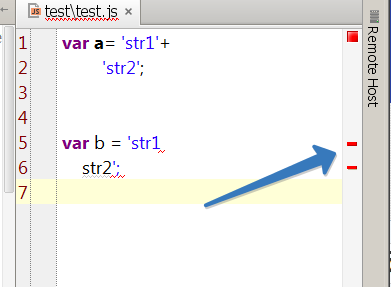
Hi there,
Are you refering to multi-line string (HERE-DOC kind of thing in terms of PHP/Ruby)?
JavaScript does not support multi-line string this way. Hence the IDE is correct here.
But this one will work:
var b = 'str1\
     str2';
or this one
http://stackoverflow.com/a/805113/783119
Я согласен - что IDE - делает здесь все правильно.
Но мне надо, что бы на многострочные переменные IDE d *.js не ругалось.
У меня JavaScript выполняется на сервере, и у сервера это за ошибку не считается.
As far as I'm aware it's not possible as such check is done on low (parser/lexer?) level and not as individual inspection and therefore such error cannot be disabled/suppressed.
Unless, maybe, this file can be associated with that another JS flavor (if it's supported by IDE, of course) where that is not treated as an error (sorry, just a thought -- not a pro in JS so just a wild guess).
Вот здесь
http://websoft.ru/db/wb/root_id/webtutor/doc.html
это используеся
As Andrey has mentioned, this check is performed on low level and can't be turned off. I can only suggest turning error highlighting off for such files - can be done using Hector icon in the lower right corner: open your file in editor, click the Hector icon and then move the slider to change the Highlighting level to 'None'
See http://www.jetbrains.com/webstorm/webhelp/changing-highlighting-level-for-the-current-file.html
При переводе поззунка в "None" ошибка остается.
Может можно указать эту ошибку как молоприоритную?
Переоткройте проект - ошибка уйдет
Возможности переопределить приоритет этой ошибки нет